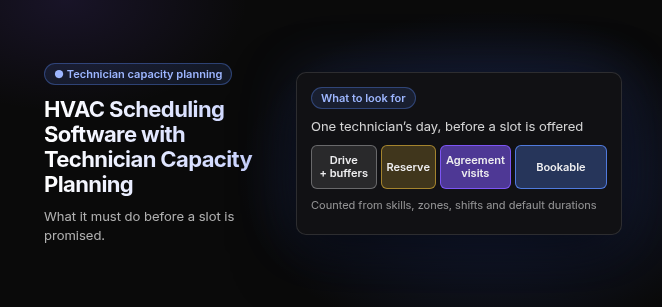
HVAC Scheduling Software with Technician Capacity Planning: what it must do before a slot is promised.
What to look for. One technician’s day, before a slot is offered: Drive + buffers · Reserve · Agreement visits · Bookable. Counted from skills, zones, shifts and default durations.
HVAC scheduling software with technician capacity planning matches incoming service calls, maintenance-agreement visits and installs to the hours, skills and locations your technicians actually have, before a time slot is promised.
Dispatch then sends the right tech by schedule, location and skills, working from a live board that shows who is free, who is overloaded and which calls are still unassigned. The capabilities that consistently matter are skill and certification matching, zone batching to cut drive time, overlap rules that prevent double-booking, and reserved capacity for emergency calls and recurring maintenance.
What features should HVAC capacity planning software have?
A capacity plan is only as good as its inputs. The first three features below are the ones every credible answer to this question includes. The rest separate a calendar that looks full from one that is actually bookable.
Skill & Certification Matching
Skill & Certification Matching: The scheduler should offer a job only to technicians whose recorded skills and certifications fit the work, so capacity is counted per skill rather than per head. Refrigerant work goes to techs holding EPA Section 608 certification, and commercial chillers go to techs qualified on that equipment instead of a residential split-system specialist. Without it, a full schedule still produces second trips and callbacks. Our guide to skills-based technician matching covers what to check.
Zone & Geographic Batching
Zone & Geographic Batching: Location, service zone and travel time count as capacity inputs. In tools built this way, work is grouped by zone, so drive time is taken out of the day before any slot is offered. For example, three tune-ups in the same zone get booked back to back instead of scattered across the territory. Without it, the calendar sells hours your techs will spend behind the wheel.
Out-of-Service-Area Warnings
Out-of-Service-Area Warnings: Before a job is assigned, the system should flag when the address falls outside the company’s service area or the technician’s zone. A call from the far edge of the territory surfaces as a warning instead of quietly landing on a tech based across town. Without it, out-of-area jobs eat capacity that the rest of the zone needed.
Real-Time Status Board
Real-Time Status Board: This is a live dispatch board or calendar showing each technician’s availability, current workload, open time slots and unassigned calls. Jobs move through status lanes: unassigned, scheduled, in transit, on site, paused, completed. A paused job still holds its tech, so the board must keep counting it against capacity. Without a live view, capacity is a guess made from memory and phone calls. Our guide to the dispatch board covers what a single board should show.
Hard vs Soft Overlap Rules
Hard vs Soft Overlap Rules: The system should block impossible overlaps, such as one technician booked into two jobs at the same time. It should warn clearly on soft conflicts, such as a job running into travel buffer or brushing the edge of an arrival window, and the dispatcher decides. Without the split, you get either double-booking or so many alerts that dispatchers stop reading them.
Emergency Capacity Reserve
Emergency Capacity Reserve: The scheduler should hold back part of each day for urgent calls instead of selling every hour. One approach is to keep the last part of daily capacity open for emergency calls. A same-day no-cool call then has a home that doesn’t require bumping a booked customer. Without a reserve, every emergency becomes a reschedule.
Default Job Durations
Default Job Durations: Every job type carries a default duration, so available hours convert into bookable jobs. A maintenance visit, a diagnostic and an install each need their own default. ServiceTitan’s help documentation warns that a job type with a zero or blank duration will cause its capacity engine to massively overbook. Without accurate defaults, nothing else in the capacity plan can be trusted.
Shifts, Time Off & Hour Caps
Shifts, Time Off & Hour Caps: Capacity starts from real shifts, approved time off and hour caps per technician, not from a generic eight-hour day. Overtime should be visible before it is booked, not discovered on the timesheet. Without it, the plan assumes techs who are off, already capped, or about to cost time-and-a-half.
Maintenance-Agreement Forecasting
Maintenance-Agreement Forecasting: Agreement visits are forecast and pre-booked months ahead, with spring cooling and fall heating tune-ups placed before demand calls arrive. Those visits consume capacity first, and the remaining hours are what the office can sell. Without forecasting, peak-season repair demand and owed agreement visits collide in the same weeks. Our guide to recurring maintenance visit scheduling covers how agreements turn into visits.
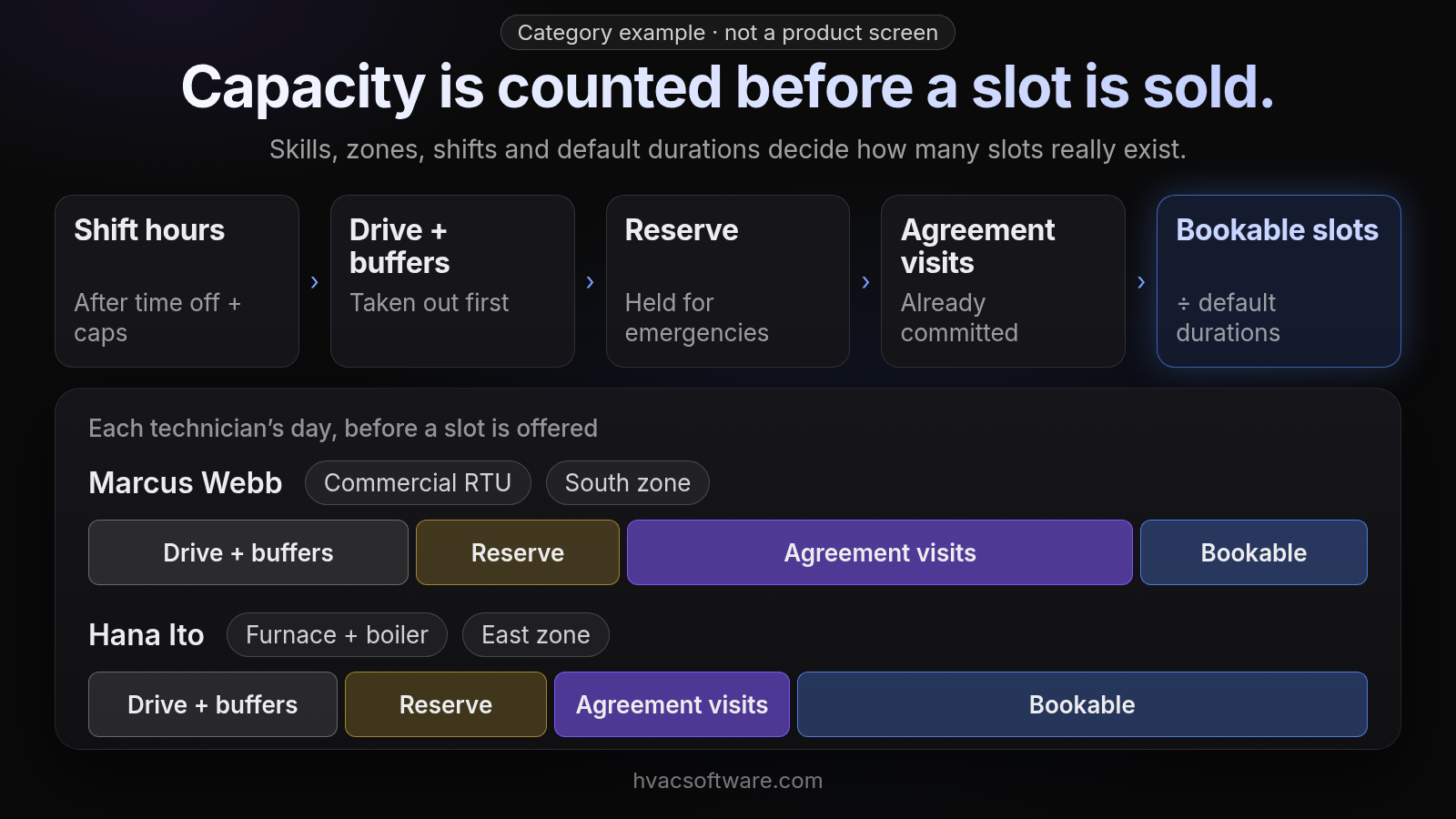
Category example · not a product screen
Capacity is counted before a slot is sold.
Skills, zones, shifts and default durations decide how many slots really exist.
- Shift hours: after time off + caps
- Drive + buffers: taken out first
- Reserve: held for emergencies
- Agreement visits: already committed
- Bookable slots: ÷ default durations
Each technician’s day, before a slot is offered (Drive + buffers · Reserve · Agreement visits · Bookable): Marcus Webb (Commercial RTU · South zone). Hana Ito (Furnace + boiler · East zone).
Scheduling vs dispatch vs route optimization: where does capacity planning fit?
The three terms get blurred in software demos, and capacity planning depends on all three:
- Scheduling: answers when. It decides which slot a job gets, based on the capacity left on the calendar.
- Dispatch: answers who, and what changes when the day goes wrong. It handles a running-long job, a sick call or an emergency.
- Route optimization: sequences travel between the jobs a technician already has.
Capacity planning is the layer underneath all three. It decides how many slots exist in the first place, so scheduling doesn’t promise time that dispatch and routing can’t deliver.
What capacity planning should do vs a basic calendar
| Area | A basic calendar | What capacity planning should do |
|---|---|---|
| Assignment | Shows an open calendar; the dispatcher picks a name | Proposes the right tech by schedule, location and skills; the dispatcher accepts or overrides |
| Maintenance agreements | Visits are booked by hand when someone remembers | Agreement visits are placed into reserved capacity ahead of the season |
| Conflicts | One generic warning, or none | Hard rules block impossible overlaps; soft conflicts warn and leave the call to the dispatcher |
| Record | Booking, dispatch and invoice live in separate places | One record from first call to paid invoice |
| Work mix | Residential and commercial run in separate tools or modes | Residential and commercial share one board and one capacity plan |
How does capacity planning handle multi-site and PM contract work?
Commercial capacity is planned at the level of sites, units and equipment, not just customer addresses. Preventive-maintenance contract visits should consume reserved capacity the same way residential agreement visits do. Tenant-requested repairs then compete only for the hours left over. PM work and tenant repairs often bill differently, so the system needs to keep that distinction on the job record rather than in the dispatcher’s head. If you run several branches, capacity also has to roll up across territories. That is a broader dispatch problem, covered in our guide to multi-location dispatch.
How does FieldCamp fit an HVAC shop that plans capacity?
FieldCamp fits contractors running residential and commercial work in one system, with a person still deciding the day. Here is what FieldCamp does today, and what to ask in a demo.
This site is published by FieldCamp.
- On the dispatch board: When your dispatcher drags a job onto a technician, the board checks skills, drive time and schedule conflicts, and the dispatcher confirms the assignment.
- For the customer: The customer gets a text when a job is assigned or moved.
- For the technician: A technician’s assigned jobs and schedule show on their phone.
- One record: Each job stays on one record from the first call to the paid invoice.
- Residential and Commercial Together: Residential service calls and commercial maintenance work run in one system, not two.
- Who decides: A person still decides the day. Assignment stays a decision the dispatcher makes.
- What it doesn’t do: FieldCamp doesn’t do route optimization or vehicle tracking. Ask in the demo how capacity limits, emergency reserves, default durations and agreement forecasting would fit your shop.
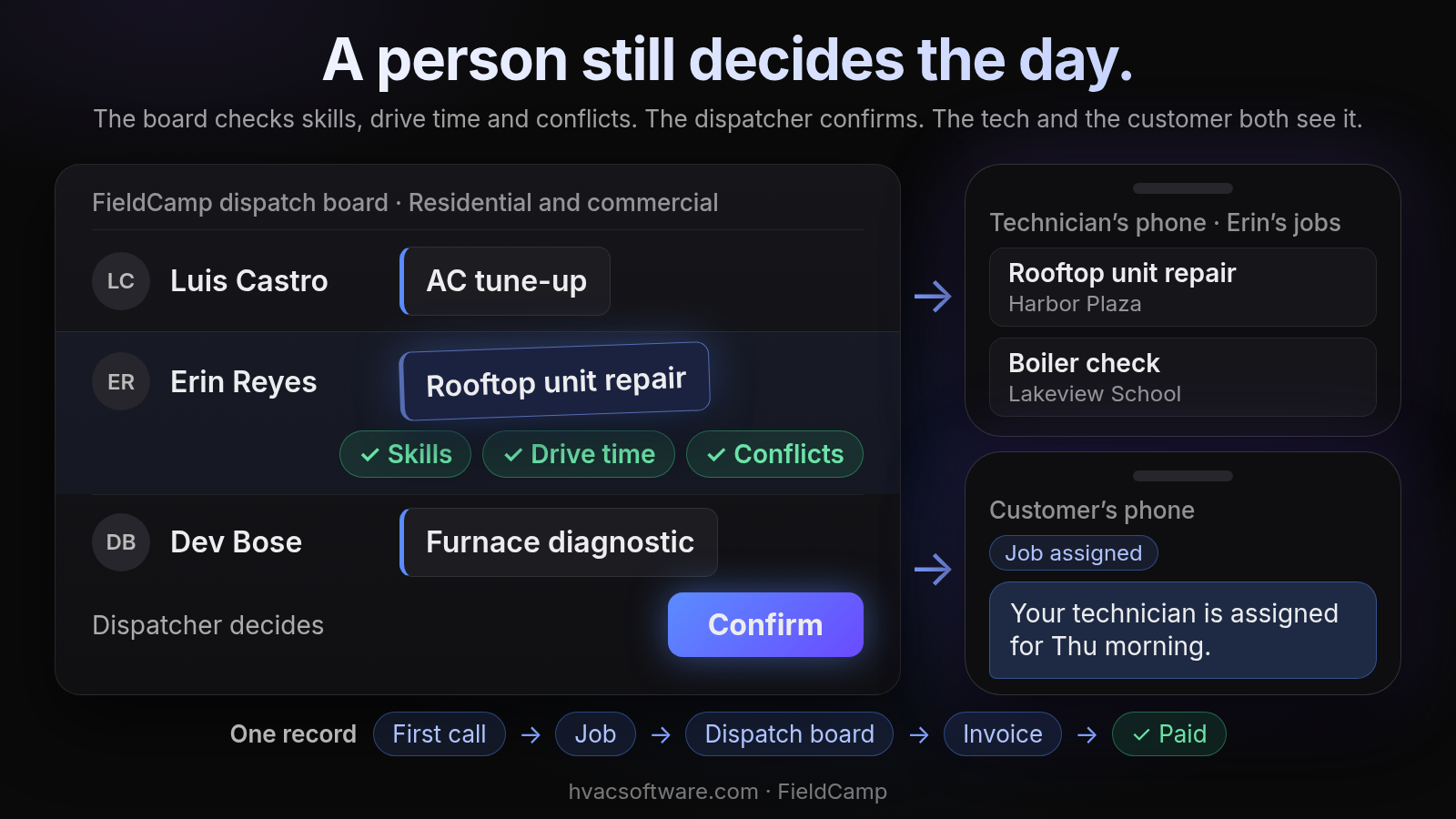
A person still decides the day.
The board checks skills, drive time and conflicts. The dispatcher confirms. The tech and the customer both see it.
FieldCamp dispatch board · Residential and commercial: Luis Castro: AC tune-up. Erin Reyes: Rooftop unit repair. Dev Bose: Furnace diagnostic.
- Skills
- Drive time
- Conflicts
Dispatcher decides: Confirm.
Technician’s phone · Erin’s jobs: Rooftop unit repair (Harbor Plaza). Boiler check (Lakeview School).
Customer’s phone. Job assigned: "Your technician is assigned for Thu morning."
One record: First call → Job → Dispatch board → Invoice → Paid.
Planning a peak season? Book a 30-minute walkthrough and bring your job types and zones.
How do other HVAC platforms approach capacity planning?
The platforms below come up repeatedly when contractors research this question. Each is described from its own pages, by its capacity model and by what adopting it asks of your office. Prices change often, so check current pricing pages before you sign.
- ServiceTitan
- Capacity planning features: Its help documentation describes Adaptive Capacity as its capacity engine, calculating availability across business units, job types, technician shifts, zones and skills, and reporting provided versus consumed capacity. Its dispatch page lists Dispatch Pro as an add-on.
- What adopting it requires: Its setup guidance asks you to confirm business units, job types with realistic default durations, skills, zones and technician shifts before adding capacity rules. Its pricing page describes per-technician pricing, so check current pricing pages.
- Joblogic
- Capacity planning features: Its scheduling page describes an engineer planner screen to monitor and balance resource, with bulk reassignment when an engineer becomes unavailable.
- What to check in a demo: How the planner handles skills, zones and agreement visits together, and how much of the balancing is done by the dispatcher rather than the system.
- Shifton
- Capacity planning features: It describes itself as a workforce management platform with shift planning, time tracking and attendance.
- What to check in a demo: Whether shift planning connects to job assignment, or runs alongside it as a separate scheduling layer.
- Other names in the same comparisons
- General field-service tools: Housecall Pro and Jobber appear as general field-service platforms.
- Commercial-focused tools: ServiceTrade and BuildOps appear as commercial-focused platforms. When evaluating any of them, ask whether capacity is calculated or only displayed.
What should you test in a capacity-planning demo?
Three checks separate real capacity planning from a colored calendar. Run each one on your own job types and zones.
Test 1: Does the system know what a conflict is?
This check is about overlap: book one technician into two jobs at the same time and see whether the system blocks it, then push a job into a travel buffer and see whether it warns and leaves the call to the dispatcher.
Test 2: Does it warn before an out-of-area assignment?
This check is about location, not overlap: the out-of-area flag should appear before the job is assigned, not after the tech is already driving.
Test 3: Do job statuses keep capacity honest through the day?
This check is about the status lanes: watch whether a paused job keeps counting against its technician’s capacity.
Capacity planning by team size and work mix
The right priorities shift with headcount and with how much commercial work you carry.
| Team size | Residential | Commercial | Mixed residential + commercial |
|---|---|---|---|
| Small team, one dispatcher | Default job durations and maintenance-agreement forecasting first; an emergency reserve keeps the owner from rebuilding the day by phone | Site- and equipment-level job records; PM contract visits blocked into capacity before tenant calls | One board for both; skill matching so commercial equipment goes only to qualified techs |
| Growing team, several dispatchers | Zone batching and hour caps become the main levers; hard vs soft overlap rules keep multiple dispatchers consistent | PM forecasting across sites; out-of-area warnings as territories widen | Separate default durations per work type; a reserve sized for both residential emergencies and commercial service calls |
| Large team, many zones | Capacity counted per skill and per zone; a status board that stays accurate without constant dispatcher clean-up | Capacity planned by site and unit across many contracts | A single capacity plan that fits both kinds of work, and a clear view of how much setup it takes |
Frequently asked questions
What is the best HVAC scheduling software for technician capacity planning?
There is no single best option. The right one counts capacity per skill and per zone, uses default durations for every job type, keeps an emergency reserve, and shows a live board the dispatcher can trust. Shortlist two or three, then run your own job types, zones and a peak-season day through each in a demo.
What scheduling software do most HVAC companies use?
Most HVAC companies run a field service management platform that handles scheduling, dispatch and invoicing together, rather than a general calendar app. Comparisons most often name ServiceTitan, Housecall Pro and Jobber, with ServiceTrade and BuildOps named for commercial work. Fit depends on headcount, how many dispatchers you have and whether you run residential work, commercial work or both.
How do you calculate technician capacity?
Start from the hours on each technician’s shift, after time off and hour caps. Subtract drive time and buffers between jobs, then subtract the emergency reserve and the hours already committed to maintenance-agreement visits. Divide what is left by the default duration of each job type to get the slots you can actually sell in each arrival window.
Is there free HVAC scheduling software with capacity planning?
Some general scheduling tools offer free plans with limits on users or features. Free tools rarely cover skill matching, zone-based capacity, default durations per job type or an emergency reserve. Check current pricing pages and count how much of the capacity math your office would still do by hand.
Does capacity planning software assign technicians on its own, or does the dispatcher decide?
Both, in the right design: the system proposes and the dispatcher accepts or overrides. The caveat is that a proposal is only as good as its inputs. If skills, zones or default durations are blank, the system will propose techs who aren’t qualified or slots that don’t exist, so check those settings are filled in before judging the proposals.
Can one capacity plan cover both residential and commercial work?
Yes, but the shared board is not enough on its own. Commercial PM visits and tenant repairs often bill differently, so the plan must keep that distinction on the job record. A quick test: if the dispatcher has to remember which commercial jobs are contract work, the plan isn’t really unified.
Final recommendation
Before you sign, make sure every job type has a default duration, every technician has a real shift, skills and zones are filled in, and part of each day is held back for emergencies. Then run one real peak-season day through each shortlisted system and watch where the capacity math breaks.