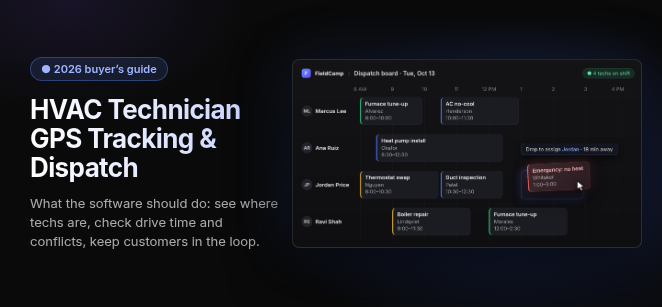
HVAC technician GPS tracking and dispatch software combines live technician location, route optimization and work-order management so the office can send the closest qualified technician, cut drive time and send customers automated ETAs.
Our standard is that location only helps dispatch when it sits on the job record, next to each tech's skills and schedule. The right tool depends on fleet size and on whether you need an all-in-one platform or dedicated fleet telematics.
Last updated: October 13, 2026. hvacsoftware.com is published by FieldCamp, which appears on this page as a working example.
What features should HVAC GPS dispatch software have?
Good HVAC GPS dispatch software puts every technician’s position on the same screen as the day’s jobs, then uses that position to assign work, plan drives and keep customers informed. Look for these six capabilities:
- Live Map & Dispatch Board: Each tech and truck appears on a map next to job statuses that move from unscheduled to in-transit to on-site to completed. The office can see where the day stands at a glance.
- Nearest Qualified Tech Assignment: The board shows who is close and able to do the job, so dispatch doesn’t send the nearest truck to work it can’t finish.
- Route Efficiency: Optimized routes, or simply routing the nearest available tech, cut drive time and fuel spend.
- Automated Customer ETAs: “On my way” texts go out from the job’s status change, which cuts the “where’s my tech?” calls to the office.
- Geofenced Time-on-Site Verification: Arrival and departure are stamped when the tech enters or leaves the job site. That gives you proof of service and timesheets you can trust.
- Driver Safety (via telematics): Harsh braking, speeding and idling scores usually come from dedicated vehicle telematics rather than the dispatch app.
The technician’s side of this setup is the mobile app, which handles signatures, photos, job history and one-tap navigation.
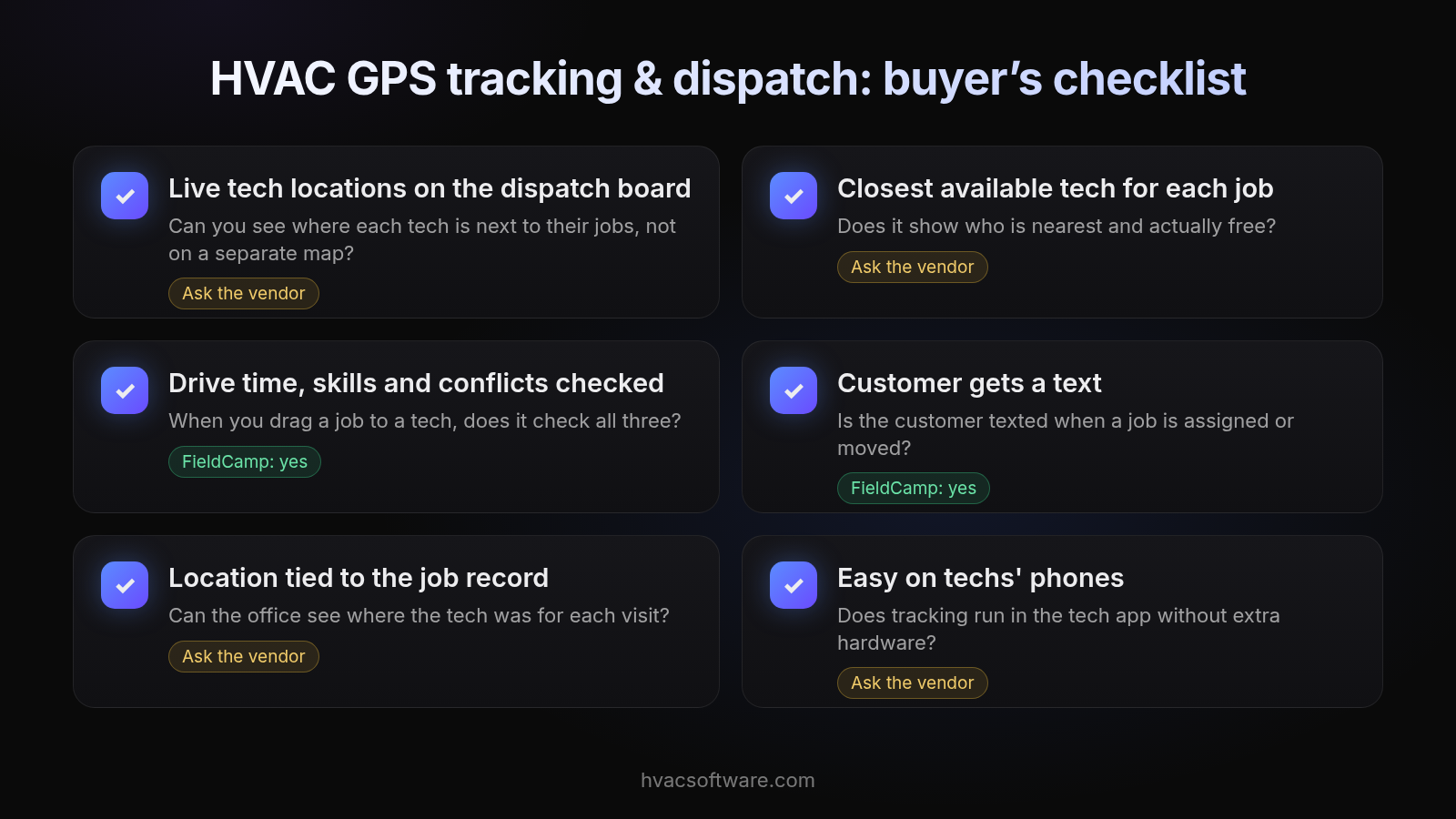
HVAC GPS tracking & dispatch: buyer’s checklist
- Live tech locations on the dispatch board. Can you see where each tech is next to their jobs, not on a separate map? Ask the vendor.
- Closest available tech for each job. Does it show who is nearest and actually free? Ask the vendor.
- Drive time, skills and conflicts checked. When you drag a job to a tech, does it check all three? FieldCamp: yes.
- Customer gets a text. Is the customer texted when a job is assigned or moved? FieldCamp: yes.
- Location tied to the job record. Can the office see where the tech was for each visit? Ask the vendor.
- Easy on techs' phones. Does tracking run in the tech app without extra hardware? Ask the vendor.
All-in-one dispatch software or dedicated fleet GPS?
Most HVAC shops choose between two tiers: an all-in-one field service platform with GPS built into dispatch, or dedicated fleet telematics that tracks the vehicle itself. Many larger fleets end up running both.
- All-in-one field service platform (FSM-native GPS): The tech’s location appears on the dispatch board and the work order. Assignment, ETAs and time-on-site all connect to the job.
- Dedicated fleet telematics: A device in each truck adds dashcams, engine diagnostics, maintenance alerts and driver behavior scoring. Shops usually add this tier as the fleet grows and vehicle costs, safety or maintenance become the problem to solve.
Our view: start with location on the job record, and add telematics when you need vehicle-level data. A truck’s dot on a map doesn’t tell dispatch which tech is certified for the work or how much of the afternoon is free. The job record does. Telematics earns its cost when fuel, safety, insurance or vehicle maintenance become the problem you’re solving.
How do the three tracking approaches compare?
FSM-native GPS tracks the work, telematics tracks the truck, and phone-only time trackers track the clock. The table below compares them on what HVAC dispatch actually needs.
| Capability | FSM-native app GPS | Dedicated vehicle telematics | Phone-only time trackers |
|---|---|---|---|
| Location on the work order | Yes, this is the point of the tier | Tracks the truck, not the work order, unless you build the join | Location at clock-in, not tied to a job |
| Skills-based assignment | Varies by platform, so test it in a demo | No | No |
| Site, unit and equipment records | Varies by platform | No | No |
| Maintenance-agreement visits | Varies by platform | No | No |
| Residential and commercial in one system | Varies by platform | Not applicable | Not applicable |
| Vehicle diagnostics and dashcams | Generally no, which is why shops pair it with telematics | Yes | No |
What does “closest qualified technician” mean in HVAC?
A closest qualified technician is the nearest tech who holds the right certification and skills, knows or can see the equipment on site, has room in the schedule, and fits the job’s priority. Distance alone gets you the closest truck, not the right one. Dispatch should weigh five inputs:
- Refrigerant certification: The tech’s EPA Section 608 certification type should match refrigerant work on the call.
- Service vs install skill: A diagnostic repair and a changeout need different people. An install crew nearby is not the answer to a service call.
- Equipment and unit history at the site: The tech should see which units are on site and what was done before arriving, not after.
- Open capacity: A tech two streets away with a full afternoon is a worse choice than one farther out with an open slot.
- Job priority: An urgent call can justify pulling a tech off lower-priority work. Routine visits should not bump each other.
Priority is also what keeps routine tune-ups from crowding out urgent calls in peak weeks.
HVAC GPS dispatch options by fleet size and work type
The vendors named most often split into the all-in-one tier and the dedicated telematics tier, and the right pick shifts with fleet size. Pricing changes often, so check current pricing pages for each vendor.
All-in-one field service platforms
- ServiceTitan: Positioned for larger operations, with advanced routing. Check current pricing pages.
- Housecall Pro: Positioned for small-to-mid-sized teams, with map-based dispatch. Check current pricing pages and confirm which tier includes the GPS features you need.
- FieldEdge: HVAC-specific, with technician visibility and dispatch control. It works alongside QuickBooks, so plan for how accounting data moves between the two.
- Workiz: Positioned for fast-moving teams that need quick job reassignment. Ask in the demo how location, status and reassignment show up on the board.
- Jobber: Scheduling-first, and often paired with dedicated telematics such as Samsara for vehicle data. That pairing means running and paying for two systems.
- FieldCamp (publisher of this site): Positioned for shops that want the dispatch board to check skills, drive time and conflicts when a job is dragged, and to text the customer when a job is assigned or moved.
Dedicated fleet telematics
- Samsara: Dashcams, engine diagnostics and driver scoring. Priced per vehicle plus in-vehicle hardware; check current pricing pages.
- Verizon Connect: Geofencing and vehicle maintenance tracking. Priced per vehicle; check current pricing pages.
- ClearPathGPS: Location pings, geozone alerts, driver scorecards and dashcams.
Which tier fits your fleet size?
Smaller fleets usually get what they need from GPS inside their dispatch platform. Larger fleets commonly add dedicated telematics for vehicle-level data. Here is a simple rule:
- Smaller fleets: Use FSM-native GPS on the job record. Put the money into assignment, ETAs and time-on-site.
- Larger fleets: Keep dispatch in the field service platform and add telematics for fuel, safety and maintenance.
- Multiple branches: Those needs go beyond GPS, so test multi-location dispatch separately in any demo.
How does FieldCamp handle location-based dispatch?
On FieldCamp's dispatch board, dragging a job to a tech checks skills, drive time and conflicts, the customer gets a text when the job is assigned or moved, and the same record runs from the first call to the paid invoice. Ask about these in a demo to see how they fit your shop:
- The field model: Ask how sites, units, equipment, service agreements, and PM versus tenant billing show up on the record dispatch works from.
- Residential and commercial in one system: Ask to see both kinds of work on the same board.
- Maintenance agreements: Ask how agreement visits land on the same board as urgent calls.
Know the limits up front. FieldCamp does not perform autonomous route optimization or track vehicles. Shops that need live vehicle location, vehicle-level routing, dashcams or diagnostics should pair it with a dedicated telematics product. Ask about offline use and migration time in the demo.
See how FieldCamp's dispatch board checks skills, drive time and conflicts. Book a demo.
How should you roll out GPS to your techs?
Roll out GPS by telling techs what is tracked, when and why before it goes live, and by tying it to things that help them, like fewer disputed hours and fewer “where are you?” calls. A quiet rollout breeds distrust. A clear one usually lands as fairness.
- Put the policy in writing. State what is tracked (company vehicles, the work app during working hours) and what isn’t.
- Lead with the tech’s benefit. Geofenced time-on-site, where your software supports it, settles timesheet questions, and automated ETAs stop the office calling for updates.
- Show techs the dispatch board. Let them see that location is used to assign work, not to watch them.
- Meet your state’s notice rules. Some states require written notice before you track, as covered in the FAQs below.
Frequently asked questions
What is HVAC technician GPS tracking and dispatch software?
It is software that shows where each technician is next to the day's jobs, so the office can assign work, plan drives and keep customers updated from one screen.
How does GPS tracking help HVAC dispatch?
It lets dispatch see who is nearby and free, send a closer tech to an urgent call, cut windshield time and give customers more accurate arrival times.
Do I need separate GPS devices in my trucks?
Not always. Many dispatch apps track the tech's phone during working hours. Dedicated in-vehicle devices add vehicle data such as diagnostics, dashcams and driver behavior.
Can dispatch software automatically assign the closest technician?
Some products suggest or assign the nearest available tech. Check whether the match also weighs skills, certifications, open capacity and job priority, not just distance.
How much does GPS tracking cost for HVAC vans?
Dedicated telematics is usually priced per vehicle, often with in-vehicle hardware on top. Check current pricing pages for each vendor and ask for the total including hardware and contract length.
Does GPS tracking work offline?
It depends on the app. Ask each vendor what happens to location and job updates when a tech loses signal, and how data syncs afterwards.
Is it legal to track HVAC technicians with GPS?
Tracking company vehicles and work apps during working hours is common, but notice rules vary by state. Put your policy in writing, tell techs what is tracked, and check your state's requirements.
What should I look for in a demo?
Bring a real busy day. Watch how a job is reassigned mid-day, whether location sits on the job record, how skills and conflicts are checked, and whether the customer is notified.
Final recommendation
Start with location on the job record, because that is what dispatch decides with. Add dedicated telematics when fuel, safety or vehicle maintenance become the problem. Whichever system you shortlist, test it on your real schedule from a busy day before you commit.