Call to job record
What One HVAC Call Should Leave Behind Four records, not a message to re-type.
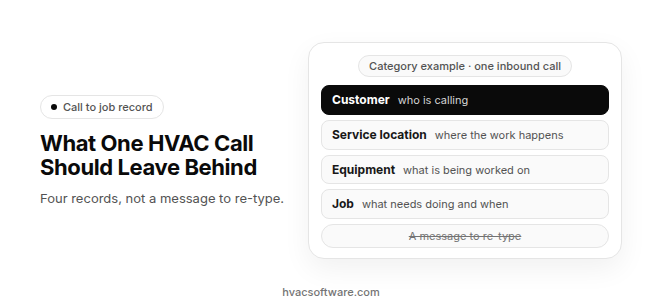
Category example · one inbound call.
- Customer: who is calling.
- Service location: where the work happens.
- Equipment: what is being worked on.
- Job: what needs doing and when.
Not this: a message to re-type.
When an inbound HVAC call is handled well, the caller ends up on a customer record, the address on a service location, the system on an equipment record and the problem on a job, so nobody in the office re-types a message the next morning.
Shops get there in three common ways: a phone system that is part of the field service software, an AI receptionist that writes into that software, or an answering service or add-on layer whose notes someone enters later. Whichever one you run, the test is the same: does the call end as a job on your board, or as a message somebody has to re-type?
What are the ways HVAC software turns an inbound call into records?
HVAC contractors use three main setups to turn an inbound call into customer and job records. They differ in who takes the call and in how much of it reaches the software without someone typing it in again.
- Phone system inside the field service software: The office line runs through the platform’s own phones. When the caller’s number matches an existing customer, that record opens for the person taking the call, and the job is created on that customer without retyping. Adopting one usually means moving your phone numbers onto that platform, so ask the vendor which calling features your plan includes.
- AI receptionist or AI voice agent: The agent picks up, asks for the caller’s name, callback number, address and issue, and either books routine work or passes the call to a person. Whether that ends as a job in your software or as a summary email depends on how it is connected, so ask to see the record it writes.
- Answering service or add-on call layer: Operators or an add-on tool take the call on top of the software you already run. What reaches your software depends on the connection: a job, a customer record, or only a message someone has to enter by hand.
These setups can run side by side, for example a person in the office by day and an answering layer after hours. Whichever mix you run, the check is whether each call ends on a real record or as a note.
What should one inbound call write to each record?
One inbound call should write to more than one record. The customer record holds who is calling, the service location holds where the work happens, the equipment record holds what is being worked on, and the job holds what needs doing and when. When those land as one block of notes instead, the office rebuilds them by hand.
This is a category model for checking any setup, not a description of any one product.
| Record | What the call should write | Where the value comes from | What goes wrong when it is missing |
|---|---|---|---|
| Customer | Name, callback number, and whether the caller is the owner, a tenant or a property manager | The caller’s number, matched to an existing customer, or what the caller says | Duplicate customers, and a callback to the wrong person |
| Service location | The address where the work happens, with access notes | What the caller says, checked against the addresses already on file | The tech drives to the billing address instead of the site |
| Equipment or unit | System type, and which unit at a site with more than one | Existing equipment on the location, or the caller’s description | The tech arrives without the right parts or service history |
| Job | The problem in the caller’s words, job type, urgency and requested window | The conversation, against your intake rules | The job lands as a note that someone re-types and re-schedules |
What happens when the caller is already a customer?
When the caller’s number matches an existing customer, the person or agent taking the call should see that customer’s service locations, equipment and past jobs before asking anything. Any new job should then be created against the existing location, not a new one. A known customer calling from a new number is the common trap: the address the caller gives should be checked against locations already on file before a second customer record is created.
What happens when the number is new?
When no customer matches the number, the call should create a new customer record and attach a service location built from the address the caller gives. The issue the caller describes goes on a new job. If the setup can only create the customer, the job still has to be built by hand, which is the same re-typing problem with an extra step.
How should a commercial or property-managed call be recorded?
A commercial call often involves three parties: the person reporting the problem, the site where the unit sits, and the account that pays. Software that collapses all three into one customer record bills the wrong party and loses the unit’s history. Keep the reporting contact, the site, the unit and the bill-to account as separate records linked to each other, so the job lands on the right unit and the invoice goes to the right account.
Why does an answering service send messages instead of entering jobs?
When an HVAC answering service isn’t entering jobs into your field service software, it usually comes down to a message-only service, no connection that can write jobs, or operators who don’t have your service areas, price book and availability. More than one cause can apply at once.
- Message-only service model: Many answering services take a message and send an email or text summary to the office. They were never set up to create a job on your board.
- No connection that can write jobs: The service may have no direct connection into your field service software, or one that can read but not write. Without write access, its operators can’t create anything in your software.
- Contract scoped to message-taking: Your agreement may only cover answering and relaying calls. In that case the service is delivering what you bought, and booking was never in scope.
- Missing context and training gaps: Operators often lack your triage rules, price book, service-area boundaries, technician skills and availability. Turnover and generic scripts make it worse, so jobs arrive incomplete or not at all.
Our comparison of an answering service vs an AI receptionist covers how the two options differ on booking, and our guide to what missed calls cost covers the calls that never reach anyone.
How can you tell what your calls actually leave in your software?
A test call shows which cause you are dealing with, because each cause leaves a different result in your software. Match what you see to a row below.
This is a category check for any answering setup, not a description of any one product.
| What lands in your software | How to spot it in a test call | What it costs your office | The fix |
|---|---|---|---|
| A booked job on the dispatch board | The job appears with a job type and window, and no one in the office touched it | Nothing extra. This is the target | Spot-check that the job type, location and equipment are right |
| A request or unassigned job | A record appears, but with no tech or window | Someone finishes the booking and calls the customer back | Decide whether review is intended for some job types, or whether the service needs to see availability |
| An estimate appointment | The call lands as a sales visit instead of a service job | Usually none, if it was meant to be an estimate | Tell the service which calls become estimates and which become service jobs |
| A customer record only | A new customer appears with no job attached | Someone re-enters the job and schedules it by hand | Check whether the connection can create jobs or only customers |
| An email or text summary | Nothing appears in the software, but a message reaches an inbox or phone | Every call is re-typed, which delays the callback | Review the contract, then the connection options |
| Nothing | No record and no message | The call is lost unless the caller tries again | Check whether the connection dropped, then the forwarding and delivery settings |
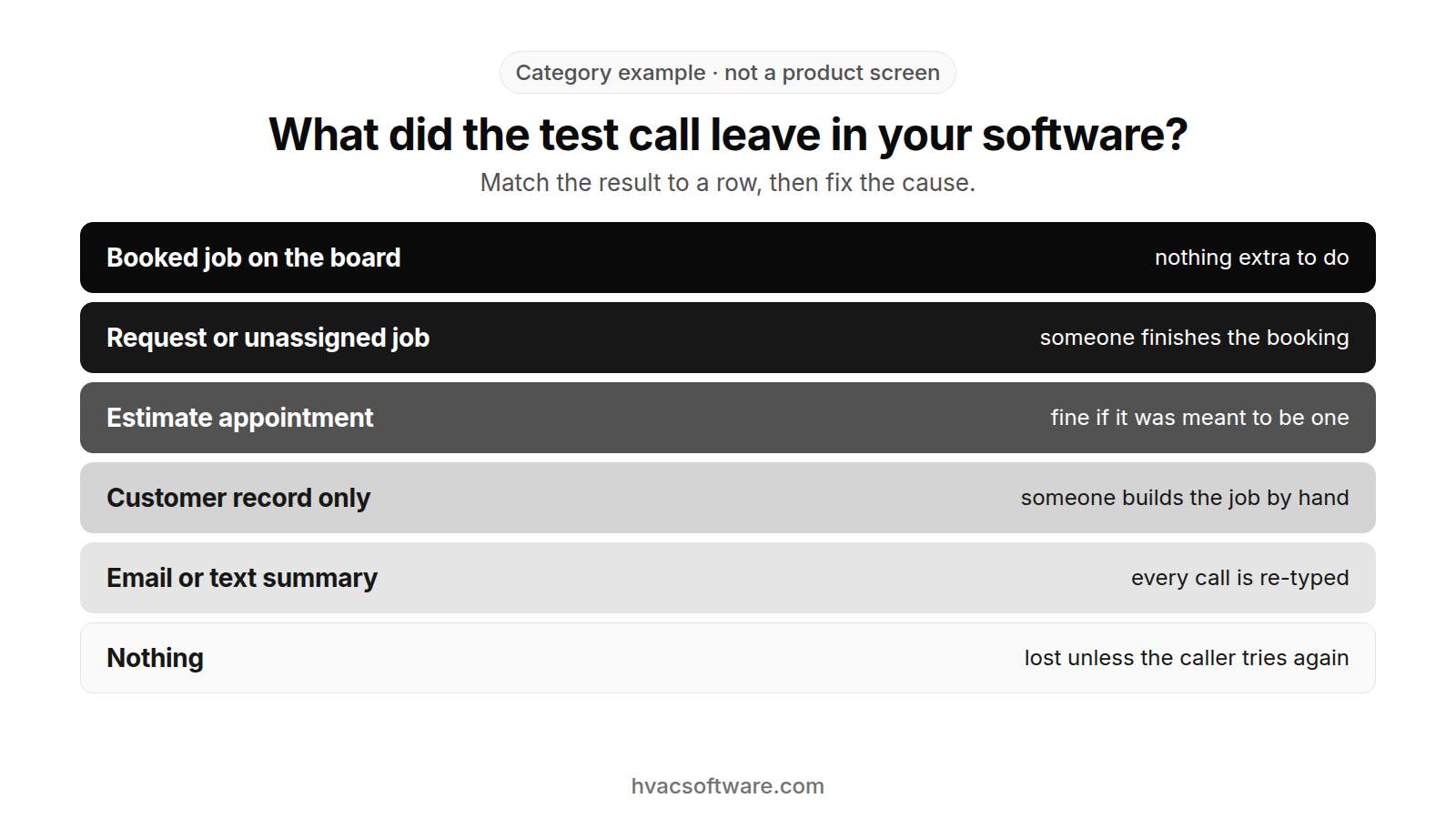
Category example · not a product screen
What did the test call leave in your software?
Match the result to a row, then fix the cause.
- Booked job on the board: nothing extra to do.
- Request or unassigned job: someone finishes the booking.
- Estimate appointment: fine if it was meant to be one.
- Customer record only: someone builds the job by hand.
- Email or text summary: every call is re-typed.
- Nothing: lost unless the caller tries again.
A working connection is not the same as one that creates a job. A connection can be live and still produce only a customer record. Some third-party connectors and webhook bridges offer a “create customer” step but no “create job” step for a given field service software, so check what the connector lists for your software before you rely on it.
How do you run a test call?
Run the test while someone watches the dispatch board, so you see the result as it happens.
- Call as a new caller: Call the line the answering service covers, during the hours it covers, and ask for a routine service visit at an address inside your service area.
- Watch the board: Have your dispatcher or office manager watch the board and the customer list during the call and for a few minutes afterward.
- Match the result to a row: Note which row of the table the call produced, and which fields came through: address, system type, membership status, job type and window.
- Repeat with a safety call: Place a second call that describes a gas smell. Confirm that the call-taker’s first instruction is to leave the building and call 911 or the gas utility from outside, before any booking or dispatch step. Place a call that describes a carbon monoxide alarm, a burning smell, smoke or fire. Confirm that the call-taker’s first instruction is to leave the building and call 911 from outside, before any booking or dispatch step, and only then that the call reaches your on-call technician instead of landing as a routine job.
How do you fix calls that don’t become jobs?
Work through the fixes from the cheapest to the biggest, because the first two often solve the problem without changing vendors.
What should the agreement cover?
- Read the scope line: Find out whether the agreement says “take messages” or “book appointments into your software.” If it only covers messages, the service isn’t failing. It is under-scoped.
- Ask about writing jobs directly: Ask your account manager whether they can write jobs into your field service software, what that costs and which job types it covers.
What should you audit if a connection already exists?
If your provider already connects to your software, problems usually come from the connection itself.
- Check the connection status: Open the connection inside your field service software. If the login has expired or the token dropped, reconnect it.
- Check the field mapping: Make sure the service’s intake fields map to your software’s required fields. A job with an unmapped required field may fail without an error or land as a note.
- Re-test after every change: Repeat the test call after you reconnect or re-map, and confirm the call lands as a booked job or a request.
- Reconcile once a day: Have the office compare the answering service’s message list against the new jobs in your software, so a call that produced a message but no job is caught the same day.
What should required fields and intake rules include?
Even a working connection produces bad jobs if the person or agent taking the call doesn’t know what to collect. Safety comes first in every script. A caller who smells gas is told to leave the building and call 911 or the gas utility from outside, before any booking or dispatch step. A caller with a carbon monoxide alarm, a burning smell, smoke or fire is told to leave the building and call 911 from outside, before any booking or dispatch step.
- Required fields by job type: List what every job must carry before it is created, such as the service address, system type, membership or service agreement status, and the problem in the caller’s words.
- Price and promise guardrails: Spell out what call-takers may quote from your price book, and what they must never promise, such as a window you don’t offer.
- Service areas and availability: Give the service your service-area boundaries and tell it how it can see availability. If it can’t see availability, it should create a request, not a confirmed window.
- An emergency rule sheet: Keep it to one page. For a gas smell, the sheet should open with the instruction to leave the building and call 911 or the gas utility from outside, before any booking or dispatch step. For a carbon monoxide alarm, a burning smell, smoke or fire, the sheet should open with the instruction to leave the building and call 911 from outside, before any booking or dispatch step. Then it lists the conditions your shop treats as emergencies, the on-call order and what routine calls should become in your software.
When should you move to an option that writes jobs?
If your provider can’t write jobs into your software, move to an option that can.
- Trade-focused human service: Some HVAC answering services and remote office teams work inside your field service software. That means giving them user access and training them on your rules.
- AI receptionist or AI voice agent: One that books into your schedule removes the re-typing step. It still needs your service areas, price guardrails and safety and escalation rules set up before it goes live. Our guide to what an AI receptionist books covers what it can leave on the board.
- Check what your plan includes: Before you switch, confirm that any built-in calling or AI answering feature is generally available on the plan you would buy, not only announced.
Is creating a job the same as dispatching a tech?
Creating a job is not the same as dispatching a tech. A job record says what needs doing. Dispatch decides who does it and when. A setup that stops at the record still leaves the office to match the work to a technician.
When call handling and dispatch are connected, a call moves through four steps:
- Records written: The customer, service location, equipment and job come from the call.
- Slot checked: The schedule is read for open windows.
- Tech chosen: A technician is picked by schedule, location and skills, and a person confirms the choice.
- Caller told: The caller hears the technician and arrival window, or hears that the office will confirm them.
Our guide to the dispatch board covers how a job is matched to a technician once it lands. Our guide to what an AI receptionist books covers what a call can leave on that board.
What should you have ready before you call your provider?
Have these answers ready before you call your answering service or software vendor, so the conversation goes straight to the cause.
- Which software you run: The field service software the jobs should land in, and the plan you are on.
- How jobs reach you today: By email, by text, through a portal, or written into your software.
- When the gap happens: Only after hours, or all day.
- Missing or incomplete: Whether jobs are missing entirely or arrive with fields left out.
- What your agreement says: Whether booking into your software is written into the contract.
How does FieldCamp fit a shop that wants one record per job?
FieldCamp fits contractors running residential and commercial work in one system, with a person still deciding the day. Here is what FieldCamp does today, and what to ask in a demo.
This site is published by FieldCamp.
- On the dispatch board: When your dispatcher drags a job onto a technician, the board checks skills, drive time and schedule conflicts, and the dispatcher confirms the assignment.
- For the customer: The customer gets a text when a job is assigned or moved.
- For the technician: A technician’s assigned jobs and schedule show on their phone.
- One record: Each job stays on one record from the first call to the paid invoice.
- Residential and Commercial Together: Residential service calls and commercial maintenance work run in one system, not two.
- Who decides: A person still decides the day. Assignment stays a decision the dispatcher makes.
- What to ask in the demo: This page does not describe call answering, phone systems and caller ID matching, call forwarding, AI receptionist or answering-service connections, creating customer, service location, equipment or job records from a call, caller recognition and duplicate-customer checks, booking on the call, schedule and availability checks during a call, call handoff to a person, triage and on-call routing, missed-call text-back, message and summary delivery, reconciling answering-service messages against jobs, third-party connectors, webhooks, connection status and field mapping, or price-book answers on the call as FieldCamp features. Ask in the demo how a call would reach your board. Also ask about linking the reporting contact, site, unit and bill-to account on commercial calls, matching a call to existing service locations and equipment, creating estimate appointments or unassigned requests from a call, required fields, service-area rules and intake rules by job type, membership or service agreement status on a call, dispatching a job created from a call by schedule, location and skills, telling the caller the technician and arrival window, giving outside answering services user access, noting the problem in the caller’s words on the job, urgency and a requested window on the job, access notes on the service location, the safety instruction a call-taker gives first on the call, after-hours answering coverage, adding call notes and call history to the customer record, moving phone numbers onto a platform’s phone system, whether the caller is the owner, a tenant or a property manager, job type on the job, showing past jobs when the caller’s number matches, a connection that can read but not write jobs, which calling or AI answering features are generally available on the plan rather than only announced, jobs arriving through a portal, voicemail when the office can’t pick up, and technician skills the person taking the call can see. For each of those, ask whether it is available today, needs setup or a connected tool, is in a pilot, or is planned.
Our HVAC contact center overview covers how calls connect to the rest of the front office, and our guide to customer text notifications covers the texts a customer gets once a job is assigned or moved.
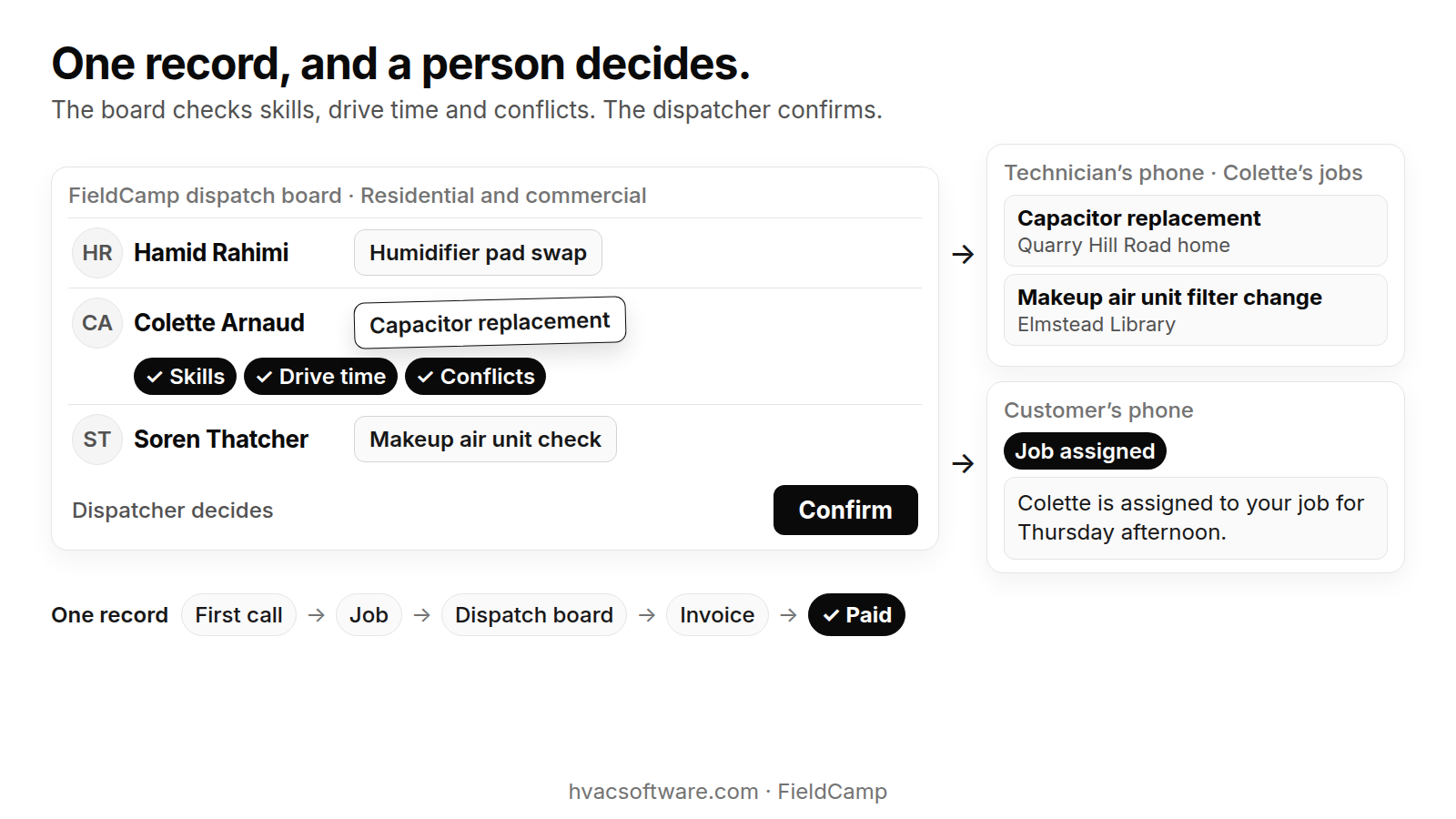
One record, and a person decides.
The board checks skills, drive time and conflicts. The dispatcher confirms.
FieldCamp dispatch board · Residential and commercial: Hamid Rahimi: Humidifier pad swap. Colette Arnaud: Capacitor replacement. Soren Thatcher: Makeup air unit check.
- Skills
- Drive time
- Conflicts
Dispatcher decides: Confirm.
Technician’s phone · Colette’s jobs: Capacitor replacement (Quarry Hill Road home). Makeup air unit filter change (Elmstead Library).
Customer’s phone. Job assigned: "Colette is assigned to your job for Thursday afternoon."
One record: First call → Job → Dispatch board → Invoice → Paid.
Checking what your calls leave behind? Book a 30-minute walkthrough to see how a job moves from the first call onto the dispatch board.
Frequently asked questions
Which software system helps track customer preferences and interactions?
A customer relationship management (CRM) system tracks customer preferences and interactions. For an HVAC business, that is usually the customer side of field service management software, where each customer record links to service locations, equipment, past jobs, invoices and notes. The useful test is whether a phone call adds to that record or sits in a separate inbox: if call notes arrive as emails, the history someone needs on the next call isn’t on the customer record.
What is the best CRM for HVAC?
There is no single best CRM for every HVAC shop. The better question is which one keeps customers, service locations, equipment, jobs and invoices together, and gets what callers say onto those records without re-typing. Before you choose, run a test call through your phone setup or answering service and check what lands: a booked job, a request, a customer record only or a message. Ask each vendor to show both residential and commercial accounts, including a site with more than one unit.
What software do most HVAC companies use?
HVAC companies typically run field service management software that covers scheduling, invoicing and customer records, often alongside a separate phone system, answering service or accounting tool. The right product depends on the size of the shop, the mix of residential and commercial work and the tools already in place. Whatever you run, check how a phone call reaches it, because the gap between the phone and the software is where jobs get re-typed or lost.
Are answering services still a thing?
Yes. Many HVAC contractors still use live answering services, alone or alongside an AI receptionist, to cover calls the office can’t take. What has changed is what shops expect after the call: a job or request in the field service software, not only a message by email or text. If your service only takes messages, check whether the contract or a connection can change that before you switch.
What are two advantages of an answering service?
First, a person picks up when the office can’t, so callers reach someone instead of voicemail. Second, a trained operator can follow your script, collect the details your jobs need and pass anything unusual to a person in your office. The trade-off is what happens next: unless the service can write jobs into your software, you get a message that someone has to re-type.
Final recommendation
Run one routine test call and one safety test call this week while someone watches the board, and match each to the table above. If calls land as messages or customer records only, check the agreement and the connection before you change vendors. Whatever you set up, make sure every script starts with the safety instruction. A caller who smells gas should leave the building and call 911 or the gas utility from outside, before any booking or dispatch step. A caller with a carbon monoxide alarm, a burning smell, smoke or fire should leave the building and call 911 from outside, before any booking or dispatch step.