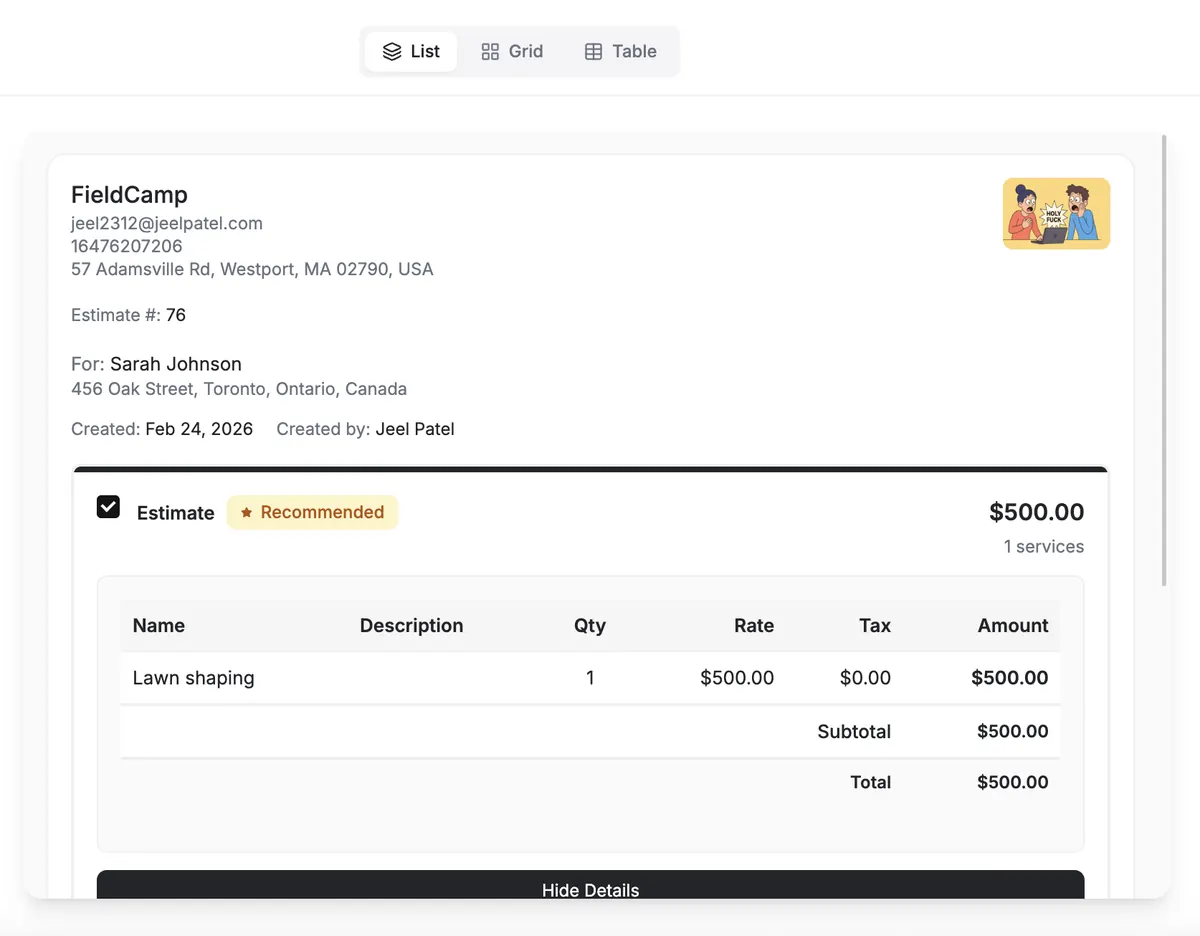
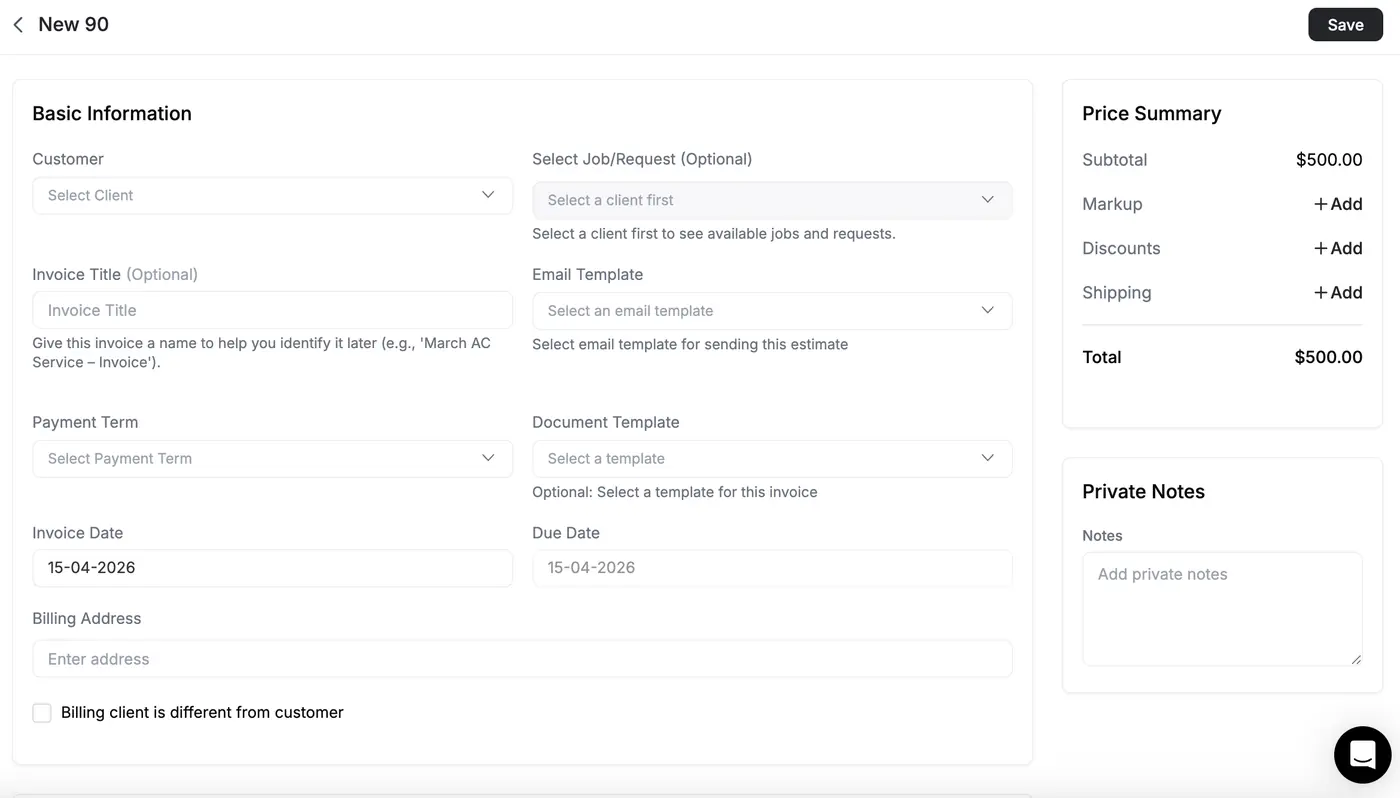
The gain is a readable chain from catalog and estimate through work, invoice, agreement, time, and accounting — with each record keeping the responsibility it actually owns.
Same engine. Different recurrence.
Kind
What it prices
What approval becomes
One-off
This visit's repair or replace, from the price book or a custom line
A job, or an invoice, on the same record
Recurring / maintenance
A seasonal package or plan sale, with a cadence the next visits read
The service agreement and the visits it creates
Phased
Sections that split a commercial change-out
Progress invoices against the accepted option
Spot quotes and membership packages are not two products. The recurrence rule is a field on the estimate, not a second tool.
02Good-better-best
Good-better-best as native structure
Present recommended options on the estimate. Star a default. The customer picks and signs.
Each option has its own line items, markup, and total. A deposit on the accepted option carries to the invoice so it is not charged twice.
Turn them on and present good, better, and best side by side.
Star a default
The middle option is the one the estimate leans toward.
One approval
The customer picks on the estimate. That choice declines the rest.
Deposit
A percent or a fixed amount. It carries to the invoice.
A single price is a yes or a no. Three options turn the conversation into which one — on the job, not in a side deck.
Signed, deposited, converted — still the same record.
1Price the workPull parts and labor from the price book, or type a one-off line. Markup and tax recalculate as you go.
2Close at the doorAnnotate the photo, collect the deposit, capture an e-signature.
3Convert onceThe accepted option becomes a scheduled job or an invoice. Line items and the deposit carry over.
Nothing gets retyped onto a second ticket. The accepted option is what dispatch and the books already know.
03Invoices & payments
Invoices, payments, and deposits
The approved estimate becomes the invoice on the same job. Collect an online card payment or record a manual payment. The deposit already taken rolls forward.
Mark the visit complete and the invoice can build from the line items, taxes, and deposits already there. Partial payments stay on that record.
An estimate that went out and has not been accepted
Configured action and connection; acceptance provides the stop path
Invoice follow-up
An invoice past due with a remaining balance
Configured action and connection; payment provides the stop path
The follow-up stays on the record. Trigger, delay, condition, action, channel connection, permission, and run result remain visible to the office.
A late invoice, as a path you can read.
On the product
The workflow is deterministic. An AI Agent step can draft the reminder from selected context. Channel connections, permissions, conditions, and stop paths still govern what the workflow can do.
Invoice unpaidstatus changed
fires
Wait three daysdelay
then
Still unpaidcondition
if true
AI agentdrafts the reminder
sends
Email, SMS, or WhatsApprequires the corresponding connection
Paid invoices stop the path.
The AI step drafts inside an explicit, connected workflow.
06Price book
Controlled products, services, and packages
One governed catalog supplies descriptions, pricing, tax behavior, and line-item structure to estimates, jobs, and invoices.
Role permissions separate people who use approved items from people who edit cost, sell price, categories, bundles, and document columns.
Price bookIllustrative interface
SERVICE PACKAGE
Heat pump replacement
Simple bundle · 4 components
Item
Cost
Sell
Tax
Outdoor unit
$4,120
$7,450
Yes
Air handler
$1,980
$3,280
Yes
Installation
—
$1,750
No
A service package, component products, cost, sell price, taxable state, permissions, and estimate preview appear in one catalog workspace.
The table explains which catalog fields follow a selected item. It does not imply that editing an issued financial document silently rewrites its history.
Catalog control
Estimate and job
Visit, request, and invoice
Name and description
Give the quoted scope a consistent customer-facing identity
Keep completed work and billing recognizable to the office and customer
Cost and sell price
Support internal pricing decisions and the visible quoted amount
Preserve the approved commercial basis while issued records retain their own history
Taxable flag
Applies the configured tax behavior when the item is selected
Carries consistent intent into billing for review under the shop's tax configuration
Line-item columns
Show the required quantity, rate, unit, code, or custom detail
Keep table structure aligned across records instead of rebuilding document layouts
Role permission
Lets approved users consume catalog items
Restricts catalog editing, costs, and administrative configuration to the intended roles
The price source stays connected to the work.
Category → Product or Service → Package or Bundle → Estimate → Job → Invoice. Cost is an internal input; sell price is customer-facing. Markup describes price relative to cost, while margin describes profit relative to sell price. A taxable flag and line-item columns preserve document behavior across the chain.
07Timesheets
Timesheets and labor profitability
The beta add-on reconstructs paid time from field evidence, then sends uncertain blocks to managers for review.
Labor margin compares job revenue with verified labor cost. It does not claim full profit or deduct materials, equipment, subcontractors, or overhead.
Timesheet rebuilds the week. Managers touch exceptions.
Add-on
Evidence
Clock punches, geofence entry and exit, visit status, route history, work timers.
Confidence
Each block is Verified, Partial, or Low. Thresholds are configurable.
Inbox
Only the entries the ledger cannot confirm, each with a suggested fix.
Payroll
A review pass over a week. Corrections append — they do not overwrite the trail.
Timesheet is an add-on. Technicians see their own day. Dispatchers and admins see the ledger. A new custom role does not inherit manager screens by accident.
The field day and the books share a job.
On the job
What the office can see
What we do not invent
Labor
Hours reconstructed against the visit, with a profitability review
A published margin percentage
Parts
Line items already on the estimate and the invoice
A second costing spreadsheet
The day
The same job the dispatcher applied
A truck-cost figure we did not compute
Labor from the timesheet and parts on the job sit on one record so the office can see what the day took. We do not publish a margin number we did not calculate.
08Books
QuickBooks Online and accounting sync
Supported finalized invoices and payments move under a connected accounting integration and current plan requirements.
Automatic forward sync begins at the connection date. Selected older invoices use manual sync; QuickBooks Desktop is excluded.
Supported records cross a documented accounting boundary.
QuickBooks Online
Finalized invoices move into the connected account; supported payments can sync in both directions.
Xero and Wave
Supported secondary accounting destinations under their documented connection behavior.
Connection date
Defines the automatic-forward boundary; selected older invoices use manual sync.
The invoice
Remains the operating record on the job while accounting owns ledger reconciliation.
The current Pro plan and a connection are required. Sync history shows outcomes; the shop still reviews mapping, duplicates, failures, and reconciliation.
09Also on the job
Front office, the dispatcher, and the shop stay next door.
They write and apply the same record. This page owns the books.
What back office includes, how one-off and recurring estimates differ, and how follow-up and QuickBooks sit on the job.
What does HVAC back office software include?
HVAC back office software connects the catalog, estimates, invoices, service agreements, workflows, timesheets, and accounting handoff to the same operating record. Online card payments use the connected Stripe path, while other payments can be recorded manually. Roles, connections, object support, and shop configuration determine which actions are available.
One-off vs recurring estimates — what's the difference?
A one-off estimate prices this visit's repair or replace. A recurring or maintenance estimate prices a seasonal package or a plan sale, with a cadence the next visits read. Both use the same estimate engine and the same customer and equipment. Approval becomes a job or an invoice on that record, or the service agreement the plan visits bill from.
How does good-better-best work in estimates?
Turn on Estimate Options and present good, better, and best side by side. Each option has its own line items, markup, and total. Star one as the default. The customer approves the option they want; that approval declines the rest. A deposit on the accepted option carries to the invoice so it is not charged twice.
Can AI follow up on estimates and unpaid invoices?
Yes, when an explicit workflow is configured for the supported estimate or invoice event. Conditions and delays control timing, while a connected action or bounded AI Agent step can prepare the next move. Accepted estimates and paid invoices provide stop conditions. Approval behavior depends on the action and configuration rather than a universal pause.
How do memberships and maintenance agreements bill?
The plan is sold as an estimate and held as a service agreement on the customer and the covered equipment. A configured recurring workflow creates the visits. A completed visit carries the agreement into the ordinary invoice. Recurring billing can charge a card on file after that invoice exists. Renewal is tracked before the term lapses.
Does it sync with QuickBooks?
Yes. Supported finalized invoices move to QuickBooks Online after the current Pro-plan connection is configured, and supported payments can sync in both directions. Xero and Wave are also documented destinations. Automatic forward behavior starts at the connection date; selected older invoices use manual sync. QuickBooks Desktop is not included.
11Book a demo
See the books on the job. Book a demo.
A walkthrough of the price book, estimate options, an invoice with a deposit, a service agreement, a workflow, labor review, and the accounting boundary. One conversation, not a self-serve signup.
Who this is for
ResidentialSell the membership at the kitchen table and bill the visits on the same record.
CommercialPhase a change-out, progress-bill it, and keep the agreement on the equipment.
EnterpriseShare a price book and one invoice flow across branches, with follow-up the office can read.
What a demo covers6 rooms
Estimates
Quote
One-off vs a maintenance package — same engine.
GBB
Options
Three options, a deposit, convert once.
Invoices
Money
The same job, a payment link, the deposit rolled forward.
Memberships
Plan
The agreement on the customer and the equipment, then the visits.
Workflows
Rules
Open estimate and aged invoice — explicit triggers, conditions, actions, and stop paths.
Books
Sync
QuickBooks Online on the finalized invoice the office already has.
Before you book
Do quotes and invoices live on the same job today?
Is the membership a record, or a spreadsheet the office reconciles?
What follow-up still depends on someone remembering to send it?