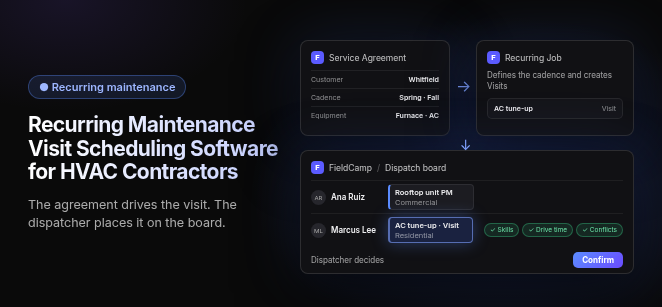
Recurring maintenance visit scheduling software for HVAC contractors turns each service agreement into scheduled visits, keeps equipment and service history on every unit, and puts those visits on the same dispatch board as emergency calls.
Fit depends on team size and residential-versus-commercial mix. FieldCamp runs residential and commercial work in one system. Buyers usually attach ServiceTitan to large multi-truck operations, Housecall Pro and Jobber to small-to-midsize residential teams, and ServiceTrade to commercial contractors with inspection-heavy service contracts.
The test: does the agreement drive the visit, or is it just a recurring checkbox?
Real recurring maintenance software lets the service agreement decide when visits happen. A repeating calendar entry does not do that. When you evaluate any system, trace one agreement end to end:
- Visit frequency: Do the agreement’s terms set the cadence, or does someone tick “repeat every six months” on a job?
- Technician capacity: Do agreement visits count against real tech availability, or do they pile up on a date nobody planned for?
- Reminders: Does the customer hear about the visit because it is due under the agreement, or only after someone books it?
- Invoicing: Does the completed visit bill against the agreement, or does the office reconcile it by hand?
- Renewal: Does the agreement flag its own expiry, or does it lapse silently?
If any link breaks, the office is still running maintenance from memory and spreadsheets. A plain recurring-job checkbox fails this test.
What should recurring maintenance scheduling software do?
It should handle five jobs, in this order of importance:
- Agreement & due-window tracking: The software knows which visits each maintenance agreement owes before anyone books them, and it opens a due window when each one comes up.
- Cadence comes from the agreement: semi-annual (spring AC tune-up, fall furnace check) for most residential plans, quarterly or custom for commercial.
- Renewal prompts go out before the agreement expires, so revenue doesn’t quietly lapse.
- Equipment & service history: Every unit carries its make, model, serial number, install date, filter size and past repairs, so the tech arrives knowing what they’re servicing.
- Reminders & self-booking links: In tools that support them, customers get text and email reminders when a visit comes due, and a booking link lets them pick a slot themselves, which can cut phone tag and missed appointments.
- Route & zone batching: In platforms built this way, due visits are grouped by ZIP code or service zone, so a tech runs a tight cluster of tune-ups instead of crossing town between them.
- Dispatch should also match skills, for example sending an EPA Section 608–certified tech when refrigerant work is likely. Our guide to skills-based technician matching covers what to check.
- Recurring billing: In tools that support it, each agreement bills on its own schedule by card on file or ACH, without the office re-entering charges.
What do most maintenance setups miss?
Most tools stop at “create the visit.” The two gaps below cause the most trouble in a real season.
How does the software track how many visits a customer has left?
The agreement should hold a visit balance. A plan that includes two tune-ups starts with two, and each completed visit comes off the balance. The office can then see at a glance who is owed a visit, who has used their entitlement, and when an extra visit should be billed rather than covered. Without a balance, techs and CSRs guess. The usual results are visits given away or members being charged for work their plan already includes.
How do you keep tune-ups from burying no-heat and no-cool calls?
Good scheduling front-loads agreement visits into spring and fall while holding open capacity for emergency calls in peak weeks. The software should place maintenance visits against real tech availability and leave room on the dispatch board for no-heat and no-cool calls. When demand spikes, it should be easy to move planned visits to a later slot inside the same due window. Agreement customers stay covered, and the urgent call still gets a truck.
How does an agreement visit run, start to finish?
When the agreement drives the visit, a well-built system moves each visit through seven steps:
- Agreement created: The plan is sold or renewed and attached to the customer, the site and the specific units it covers.
- Cadence set: The plan’s terms set the visit rhythm, such as semi-annual spring and fall or quarterly.
- Due window opens: The software flags the visit as due ahead of time and holds it until it is placed.
- Visit booked: The customer either picks a time from a booking link, or the office places the visit on the dispatch board alongside nearby work.
- Visit completed: The tech works from the unit’s equipment history on mobile and adds notes and findings to it.
- Entitlement used and invoice created: The completed visit comes off the plan’s balance and is billed according to the agreement.
- Renewal prompt sent: Before expiry, the customer is prompted to renew and the cycle starts again.
In FieldCamp, each job stays on one record from the first call to the paid invoice, so the visit and the bill never drift apart.
On the agreement side, FieldCamp keeps the agreement, recurring work and billing distinct: the Service Agreement holds the terms, a Recurring Job defines the cadence and creates Visits, and an Invoice bills completed work or configured recurring charges through the ordinary invoice flow. Agreement fields, frequencies, entitlements and renewal steps can vary by account; the memberships page shows how they connect.
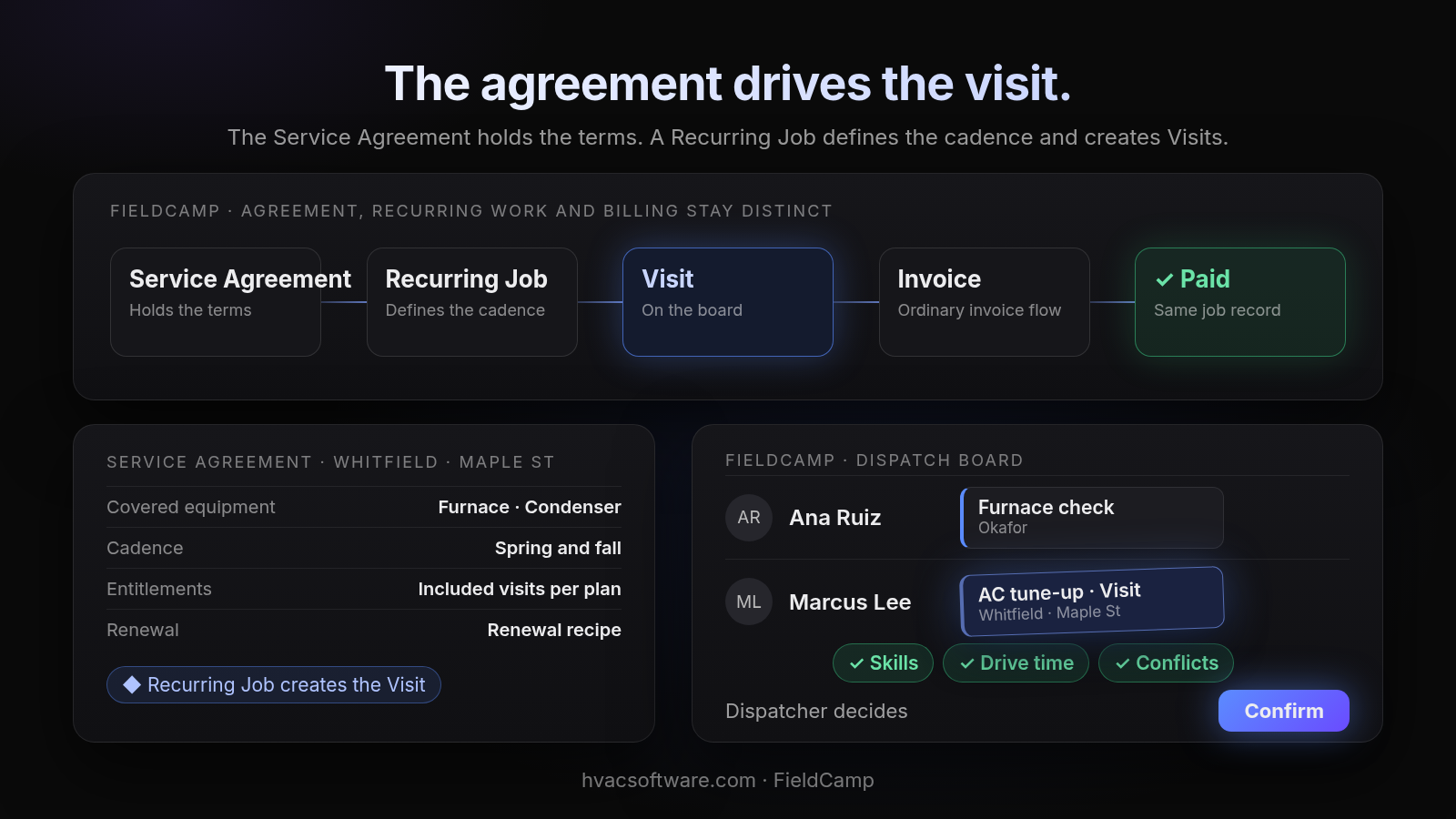
The agreement drives the visit.
The Service Agreement holds the terms. A Recurring Job defines the cadence and creates Visits.
Diagram details
- Service Agreement: holds the terms
- Recurring Job: defines the cadence
- Visit: on the board
- Invoice: ordinary invoice flow
- Paid: same job record
Service Agreement, Whitfield · Maple St: Covered equipment Furnace · Condenser. Cadence Spring and fall. Entitlements Included visits per plan. Renewal Renewal recipe. Recurring Job creates the Visit.
FieldCamp dispatch board: Ana Ruiz: Furnace check (Okafor). Marcus Lee: AC tune-up · Visit (Whitfield · Maple St). Checks: Skills, Drive time, Conflicts. Dispatcher decides: Confirm.
Can residential and commercial agreements run in one system?
Yes, and for a shop that does both, they should. Commercial maintenance agreements work differently from a residential two-visit plan, but both belong on the same dispatch board with the same techs.
What does a commercial agreement need that a residential plan doesn’t?
A commercial agreement often covers several sites and many units, such as rooftop units across a property manager’s buildings. The software has to model sites, units and equipment under a single agreement. It also has to keep preventive maintenance billed to the agreement separate from tenant-requested repairs billed on their own. Property-manager contacts need to be stored alongside the site’s on-site contacts, so approvals and invoices go to the right person.
Why one system instead of two?
When residential plans and commercial agreements live in separate tools, dispatch can’t see the whole week, and billing gets reconciled by hand. FieldCamp runs residential and commercial work in one system, and residential memberships and commercial maintenance agreements can use different terms while retaining the same object model. Whether the stop is a house or a multi-unit rooftop site, the visit lands on the same board.
This site is published by FieldCamp.
- On the dispatch board: When your dispatcher drags a visit onto a technician, the board checks skills, drive time and schedule conflicts, and the dispatcher confirms the assignment.
- For the customer: The customer gets a text when a job is assigned or moved.
- For the technician: A technician’s assigned jobs and schedule show on their phone.
- One record: Each job stays on one record from the first call to the paid invoice.
- Who decides: A person still decides the day. Scheduling and assignment stay decisions the office makes; an agreement on its own doesn’t prove a tech has room for the visit.
- What it doesn’t do: FieldCamp doesn’t do route optimization or vehicle tracking. Ask in the demo how reminders, self-booking and recurring billing would fit your agreements.
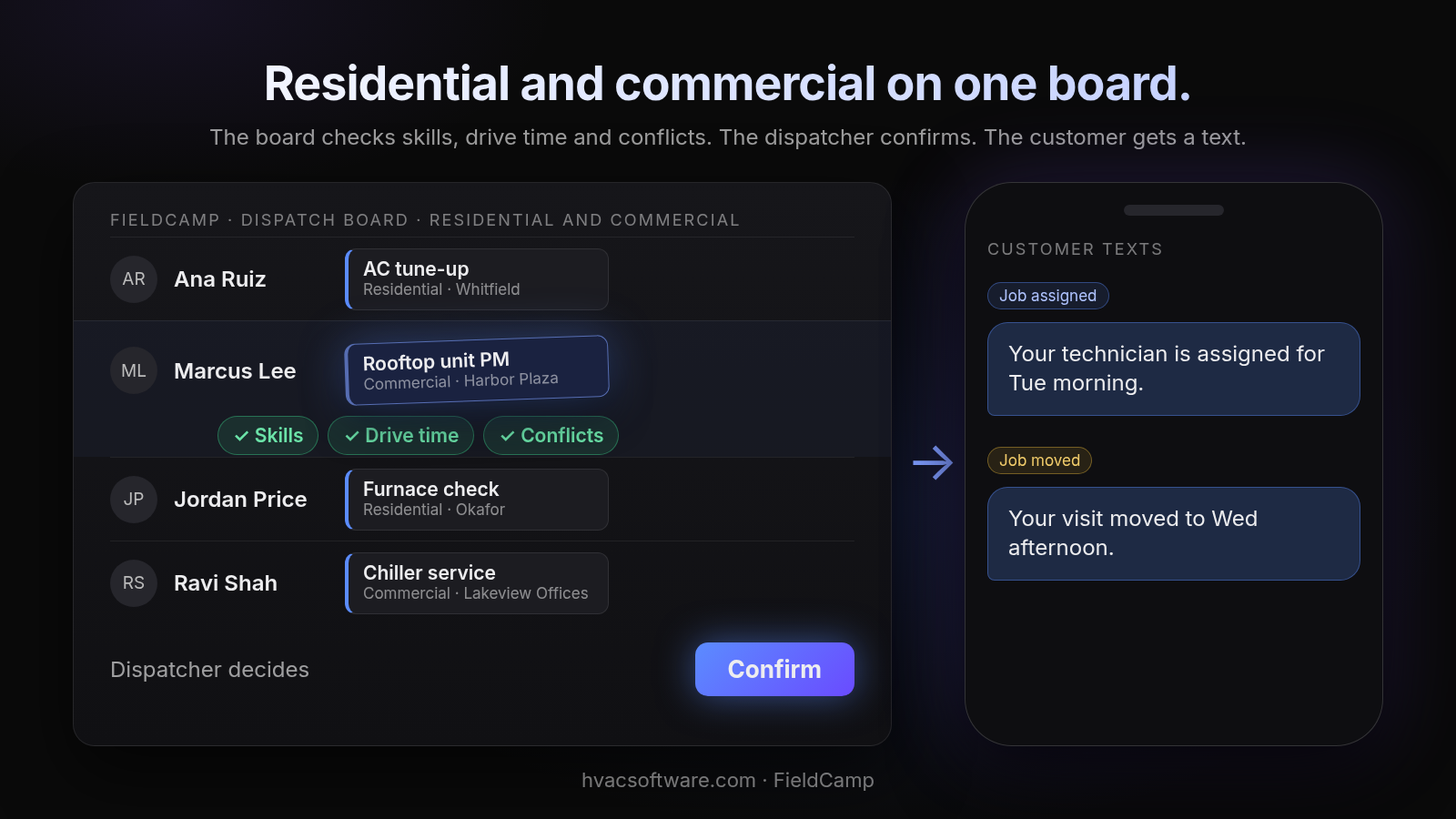
Residential and commercial on one board.
The board checks skills, drive time and conflicts. The dispatcher confirms. The customer gets a text.
Diagram details
FieldCamp dispatch board, residential and commercial: Ana Ruiz: AC tune-up (Residential · Whitfield). Marcus Lee: Rooftop unit PM (Commercial · Harbor Plaza). Jordan Price: Furnace check (Residential · Okafor). Ravi Shah: Chiller service (Commercial · Lakeview Offices).
- Skills
- Drive time
- Conflicts
Dispatcher decides: Confirm.
Customer texts. Job assigned: "Your technician is assigned for Tue morning." Job moved: "Your visit moved to Wed afternoon."
See how your maintenance agreements would run in FieldCamp: book a 30-minute walkthrough.
Which recurring maintenance setup fits your shop?
The right setup depends on two questions: how many technicians you run, and whether your agreements are residential, commercial or both. Use the table to see what each kind of shop should require.
| Your shop | Agreement → visit | Site / unit model | PM vs tenant billing | Dispatch by schedule, location & skills | Time to switch |
|---|---|---|---|---|---|
| Residential, small to mid-size | Required: semi-annual plans create the visits | Per-home equipment history is enough | Rarely needed | Zone batching for spring and fall tune-ups | Should not need an enterprise project |
| Multi-truck, larger teams | Required at volume: visits must not depend on office memory | Per-unit history across a large customer base | Useful for any commercial accounts | Capacity planning around peak no-heat and no-cool weeks | Weigh rollout effort and admin staffing |
| Commercial & multi-site | Quarterly or custom cadences per site | Required: sites, units and equipment under one agreement | Required | Matching technician skills for rooftop and refrigerant work | Agreement data must migrate cleanly |
| Mixed residential + commercial | Both plan types on one board | Required for the commercial side | Required | One board for houses and sites | Hands-on migration of both agreement types |
How does other HVAC software handle recurring maintenance?
Most established platforms support maintenance agreements in some form. What differs is what each one takes to adopt. Prices change often, so check current pricing pages on each vendor’s own site.
- Housecall Pro: Housecall Pro is the platform most often named for small-to-midsize residential teams, and it says residential and commercial teams can use its service plans. Its service agreement pages describe recurring jobs generated from the selected plan, service reminders and recurring billing. Its pricing page lists Recurring Service Plans on the Max plan, so check which tier you need on current pricing pages.
- ServiceTitan: ServiceTitan is the name tied to large multi-truck operations. Its service agreement pages cover residential and commercial agreements, due maintenance visits and agreement renewals. Its pricing page describes per-technician pricing by request; check current pricing pages and ask how long configuration takes before your agreements run in it.
- Jobber: Jobber is named for small-to-midsize teams running recurring jobs. Its HVAC page describes recurring maintenance jobs that are scheduled and invoiced, reminders when service is due, and a saved card charged for recurring maintenance. Plans are tiered by user count, so check which tier includes the recurring-billing features you need on current pricing pages.
- ServiceTrade: ServiceTrade is aligned with commercial contractors whose service contracts are inspection-heavy, and it says it is built for commercial service teams, not residential contractors. Its pricing is based mainly on technician count, and its Enterprise suite for commercial and mechanical service lists re-occurring contract pricing and proposal management. Shops that also sell residential two-visit plans should ask how those would be scheduled and billed alongside commercial work.
Whatever you compare, run each option through the agreement-drives-the-visit test above before looking at price.
Frequently asked questions
What is the best software for HVAC scheduling?
There is no single best option. For recurring maintenance, the right one lets the service agreement drive the visit, places those visits against real technician capacity, and keeps them on the same board as emergency calls. Shortlist two or three and run one real agreement through each in a demo.
What software do most HVAC companies use?
Most HVAC companies run a field service management platform for scheduling, dispatch and invoicing rather than a stand-alone calendar. Comparisons most often name ServiceTitan, Housecall Pro and Jobber, with ServiceTrade named for commercial service work. Fit depends on team size and whether your agreements are residential, commercial or both.
Are HVAC maintenance agreements worth it?
For many contractors they are, because agreements put predictable spring and fall work on the schedule and keep customers in regular contact with the shop. They only pay off when the software tracks which visits each agreement owes, places them inside real capacity and bills them against the agreement. Otherwise the office ends up managing them from memory.
How often should HVAC maintenance visits be scheduled?
Most residential plans schedule two visits a year: a spring visit for cooling and a fall visit for heating, each before its peak season. Commercial agreements often run quarterly or on a custom cadence set per site and per unit. The agreement’s terms should set the cadence, not a repeating calendar entry.
Is there free software for HVAC maintenance scheduling?
Some general scheduling and maintenance tools offer free plans with limits on users or features. Free tools often leave agreements, equipment history and billing in separate systems, so check current pricing pages and count the re-keying you would still do.
Can I schedule recurring spring AC tune-ups and fall heating checks from one agreement?
Yes, in platforms where the service agreement drives the visit rather than a recurring-job checkbox. The agreement holds the cadence, the software opens a due window ahead of time, and the visit is booked by the customer or placed on the dispatch board by the office. Most residential plans use a semi-annual cadence, while commercial plans often run quarterly or custom schedules per site.
Final recommendation
Pick the system where the service agreement drives the visit, the visit lands on the same board as your emergency calls, and the completed work bills against the agreement. Whichever platform you shortlist, run one residential plan and one multi-site commercial agreement through it live in the demo.