Category example
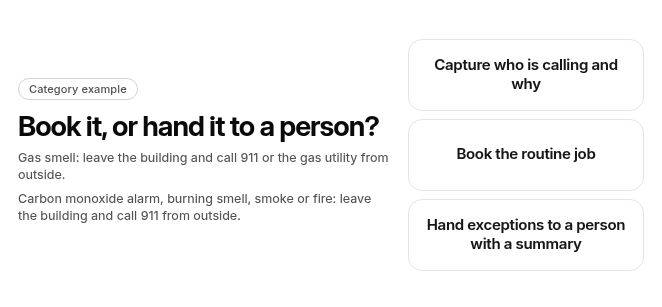
Book it, or hand it to a person?
Gas smell: leave the building and call 911 or the gas utility from outside.
Carbon monoxide alarm, burning smell, smoke or fire: leave the building and call 911 from outside.
- Capture who is calling and why
- Book the routine job
- Hand exceptions to a person with a summary
Live call transfer from an HVAC AI receptionist to office staff comes in three setups: an agent inside your field service software, a standalone AI receptionist, or a hybrid AI-and-human service. In each, the AI answers, captures the caller’s details and issue, and live-transfers to office staff or an on-call technician when a trigger is hit. The standard to hold every option to is simple: the AI books the routine job, and a person in the office handles the exceptions.
One rule sits above every transfer. If a caller smells gas, the first instruction is to leave the building and call 911 or the gas utility from outside, before any intake, booking or transfer step. If a carbon monoxide alarm is going off, or the caller reports a burning smell, smoke or fire, the first instruction is to leave the building and call 911 from outside, before any intake, booking or transfer step.
What are the three ways to get AI-to-office live call transfer?
The options split along one axis. Either the AI receptionist lives inside the field service software that holds your jobs, or it sits outside and syncs to it. The three routes below share the same three questions: how the transfer works, what reaches the job record, and what adopting it requires.
Inside your field service software
Built-in AI receptionist: the voice agent is part of your field service management (FSM) platform. It transfers the live call to office staff or a dispatcher inside the same system that holds the customer and the job.
- How live transfer works: The agent answers, triages and books inside the platform. When a call needs a person, it hands the live caller to a configured office line or user.
- What syncs to the job record: Less has to sync when the call, the customer and the job sit in the same system. Depth still varies by platform, so check whether the job opens on transfer or only after the call ends.
- What adopting it requires: Your shop has to run on that field service software. Before signing, ask which plan tier includes the agent, whether it’s billed as an add-on on top of the subscription, and who on your team administers the call rules.
Standalone AI receptionist
Standalone AI receptionist: a separate voice-agent service answers your line. It hands off live calls by forwarding them to numbers you configure.
- How live transfer works: Routing rules in the receptionist’s own dashboard decide which triggers send the caller to which number. The transfer then happens over the phone network.
- What syncs to the job record: This depends on the integration. Some push the caller’s details and a summary into your field service software. Others stop at a notification, which means the office re-enters the details.
- What adopting it requires: You take on a second vendor, an integration to set up and maintain, and call rules that live in a different system from your schedule and price book.
Hybrid AI plus human receptionists
Hybrid AI and human receptionist: an AI handles intake and a team of live receptionists steps in. The call is then transferred to your office staff when it needs someone from your shop.
- How live transfer works: The AI answers first, an outside receptionist can take over, and either one can pass the live caller to your office.
- What syncs to the job record: Intake details reach your field service software only through the service’s integration. Check which fields actually land and whether the outside receptionist’s notes come with them.
- What adopting it requires: You pay a separate subscription. You keep your call scripts current with an outside team, and you add one more party between the caller and your dispatcher.
How do the three setups compare?
This is a category comparison, not a description of any one product. Confirm each answer in a demo against your own setup.
| Question | Agent inside your field service software | Standalone AI receptionist | Hybrid AI and human service |
|---|---|---|---|
| Transfer lands with the job record open | Can open the job on transfer; confirm in a demo | Depends on integration depth | Depends on integration depth |
| Business-hours office routing vs. after-hours routing | Can sit alongside your schedule and on-call rotation; confirm in a demo | Set in a separate dashboard | Set with the outside team’s scripts |
| AI books routine jobs vs. hands off exceptions | Can book to your schedule; confirm in a demo | Books only if it can write to your schedule | AI or receptionist books if integrated |
| Residential and commercial sites and units | Depends on how that software models sites and units | Limited to what the integration passes | Limited to what the integration passes |
In short, an agent inside your field service software may open the job for the office when a call is transferred, so confirm it in a demo. Standalone and hybrid services keep your current field service software, so how much the office sees on transfer depends on what their integration carries. Routing for business hours and after hours is easiest to keep accurate when it sits next to the schedule and on-call rotation it depends on. Commercial detail such as sites and units only reaches the office if the system taking the call can model it.
What is the difference between a warm and a cold transfer?
Warm transfer: the AI receptionist briefs the office staff member with a summary of who’s calling and why, then connects the caller. The person picking up starts mid-conversation.
Cold transfer: the AI routes the caller straight through to the destination without a briefing. It’s sometimes called a blind or direct transfer.
A warm transfer takes a little longer and saves the caller from repeating themselves. A cold transfer is faster but puts the first question back on your CSR. Some shops use both: warm for pricing and service questions, cold where speed matters more than context.
How does a live call transfer from an AI receptionist flow?
- Answer: The AI receptionist picks up the call, including overflow when the office lines are busy.
- Safety first: If a caller smells gas, the agent should tell them to leave the building and call 911 or the gas utility from outside. If a carbon monoxide alarm is going off, or the caller reports a burning smell, smoke or fire, the agent should tell them to leave the building and call 911 from outside. No intake, booking or transfer step comes before that.
- Triage: It collects the caller’s name, service address, equipment and issue, then checks the call against your transfer triggers.
- Book or transfer: Routine calls that fit your booking rules are scheduled without a transfer. A call that hits a trigger is live-transferred instead.
- Summary to staff: The person receiving the call gets the caller’s details and the AI’s summary of the issue.
- Fallback: If the first destination doesn’t pick up, the call moves to a backup person or line instead of dead-ending in voicemail.
What triggers a transfer to office staff?
- Safety comes first: If a caller smells gas, the first instruction is to leave the building and call 911 or the gas utility from outside. If a carbon monoxide alarm is going off, or the caller reports a burning smell, smoke or fire, the first instruction is to leave the building and call 911 from outside. No transfer step comes before that.
- Urgent language: After that, if anyone in the home is in danger from heat or cold, the caller should call 911. Then no-heat, no-cool and water-leak calls go to office staff or the on-call technician.
- Pricing questions: the caller wants a quote or a price the AI isn’t set up to give.
- A request for a person: the caller asks to speak to someone.
- Outside booking rules: the job type, location or timing falls outside what you’ve allowed the AI to book.
Our guide to how emergency calls reach a tech covers escalation levels and what happens when the on-call tech doesn’t answer, so this page stays on the office handoff.
What should the office see when the transfer lands?
This is the part of the handoff where a transfer either saves the call or wastes it. The standard covers four things.
Where does the call go during business hours vs. after hours?
During business hours, a live transfer should reach office staff or the dispatcher: a specific person or group, not a general ring-all line. After hours, the same trigger should route to the on-call technician or your after-hours answering line. Both destinations should be set next to the schedule they depend on, so a holiday or a shift change is updated in one place.
Is the job record already open when the call is answered?
The CSR who picks up should see the customer, the site, the unit and the AI’s summary before saying hello, with the caller’s details already in your field service software. They shouldn’t have to re-ask the name, the address or the problem. The call then becomes part of the job record instead of a sticky note waiting to be typed in.
Which jobs can the AI book, and which must it hand to a person?
The office decides this, not the AI vendor. One way to split it lets the AI book routine service and maintenance visits into open slots. Anything that needs judgment goes to a person: commercial accounts with multiple sites, callers disputing a bill, callers asking for a price the AI isn’t set up to give, or anything matching a trigger. The rule list should be readable and editable by your office manager.
What happens when the office line doesn’t pick up?
A transfer that rings out is worse than no transfer, because the caller was promised a person. The fallback should be explicit: roll to the next person in rotation, then to a backup line. If nobody answers, the AI should tell the caller when they’ll get a callback and leave a task on the job, not just a voicemail.
Category example · not a product screen
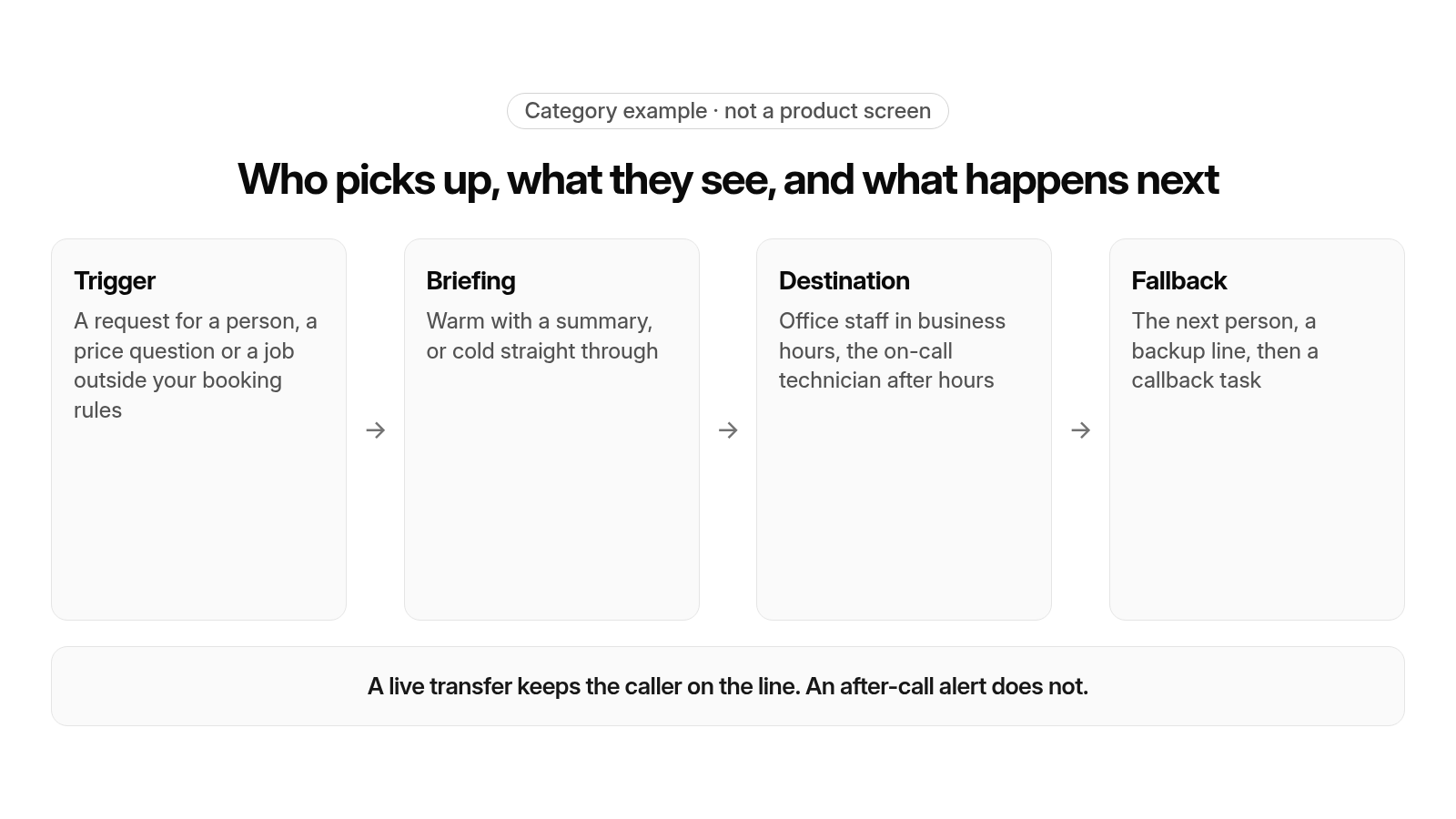
Who picks up, what they see, and what happens next
- Trigger: A request for a person, a price question or a job outside your booking rules
- Briefing: Warm with a summary, or cold straight through
- Destination: Office staff in business hours, the on-call technician after hours
- Fallback: The next person, a backup line, then a callback task
A live transfer keeps the caller on the line. An after-call alert does not.
Is a live transfer the same as an after-call alert?
No. Live transfer: the AI receptionist bridges the caller, still on the line, to a person in your office or on call. After-call alert: the AI takes the details, ends the call, and then sends a text or email telling someone to call back.
Both have a place, but they aren’t interchangeable. A tool described as offering live transfer may only send an alert after hang-up. Test it yourself: place a call, say a trigger phrase, and see whether a person comes on the line or your phone buzzes with a message after you’ve hung up.
What should you test in a live transfer demo?
- Report a gas smell and confirm the agent tells you to leave the building and call 911 or the gas utility from outside. Repeat the call as a carbon monoxide alarm and confirm the agent tells you to leave the building and call 911 from outside. No intake, booking or transfer should come before that.
- Call during business hours, ask for a person, and confirm the transfer reaches the right office staff member rather than a general line.
- Say a no-heat phrase after hours. The agent should give the safety instruction first: a caller who smells gas should leave the building and call 911 or the gas utility from outside. A caller with a carbon monoxide alarm, a burning smell, smoke or fire should leave the building and call 911 from outside, and anyone in danger from heat or cold should call 911. Only then should the call route to the on-call technician.
- Ask a pricing question the AI shouldn’t answer and listen for a warm briefing or a cold handoff.
- Watch the receiving screen: is the job record open, with the customer, site, unit and summary, when the call is answered?
- Let the office line ring out and see where the fallback sends the call.
- Call as a commercial customer with more than one site and check whether the right site comes up.
- Hang up mid-intake and see whether a partial record and a callback task survive.
Where does live transfer to office staff matter most?
After-hours and overflow calls
The AI receptionist should cover overflow when every CSR is on a call and the whole line after closing. The difference between setups shows up the next morning. Calls that were booked, transferred or turned into callback tasks should all sit on job records, not in a voicemail queue. Our guide to why after-hours calls hit voicemail covers weekend and holiday routing, and our guide to why calls overflow in peak season covers a heat wave or cold snap.
Urgent no-heat and no-cool calls
Urgent calls follow the safety rule first. If a caller smells gas, the first instruction is to leave the building and call 911 or the gas utility from outside, before any intake, booking or transfer step. If a carbon monoxide alarm is going off, or the caller reports a burning smell, smoke or fire, the first instruction is to leave the building and call 911 from outside, before any intake, booking or transfer step. After that, if anyone in the home is in danger from heat or cold, the caller should call 911. Then the call goes to the on-call technician, and it only resolves if dispatch can send the right tech by schedule, location and skills. That’s why it matters that routing and dispatch work from the same schedule.
Commercial callers with multiple sites and units
Property managers call about a specific building and a specific unit, and billing may run to the property manager or to a tenant. When the AI hands off a commercial call, the office needs the correct site and unit on screen. That only works if the system taking the call can model sites and units. Our guide to how an AI receptionist spots members covers matching an existing or commercial caller to the right account.
Which setup fits your shop?
- If your field service software offers its own agent: that agent is the natural thing to evaluate first. Confirm which plan includes it, how it’s billed, and who will own the routing rules, then run it through the demo checklist above.
- If your field service software doesn’t: compare a standalone or hybrid service. Weigh how much the integration actually carries onto the job record when the call lands.
- If your biggest gap is in-office handoff: focus your evaluation on the job record being open on transfer and on the fallback when the office line is busy.
- If your biggest gap is after hours: focus on routing to the on-call technician and on how the morning picks up what happened overnight.
- If you run residential and commercial work: test a multi-site caller before anything else, because that’s where integrations can lose detail.
- If you’re changing field service software anyway: test whether the agent inside it opens the job for the office when a call is transferred.
Our guide to what an AI receptionist books covers what should land on the dispatch board once a call is booked, our guide to how an AI receptionist qualifies leads covers the intake questions before a handoff, our guide to how an AI phone agent quotes fees covers price questions, and our guide to why calls don’t land as job records covers what one inbound call should write onto the customer and job records.
How does FieldCamp fit a shop that runs residential and commercial service?
FieldCamp fits contractors running residential and commercial work in one system, with a person still deciding the day. Here is what FieldCamp does today, and what to ask in a demo.
This site is published by FieldCamp.
- On the dispatch board: When your dispatcher drags a job onto a technician, the board checks skills, drive time and schedule conflicts, and the dispatcher confirms the assignment.
- For the customer: The customer gets a text when a job is assigned or moved.
- For the technician: A technician’s assigned jobs and schedule show on their phone.
- One record: Each job stays on one record from the first call to the paid invoice.
- Residential and Commercial Together: Residential service calls and commercial maintenance work run in one system, not two.
- Who decides: A person still decides the day. Assignment stays a decision the dispatcher makes.
- What to ask in the demo: This page does not describe call answering, AI receptionists, voice agents or phone-system connections, live call transfer, warm or cold transfer, triage, booking on the call, call routing, fallback routing, callbacks or after-call alerts as FieldCamp features. Ask in the demo how a call that asks for a person during business hours, an after-hours call about a system that won’t heat and a transfer that nobody picks up would reach your office and your board, and for each piece, whether it is available today, needs setup or a connected tool, is in a pilot, or is planned. Also ask about giving the safety instruction first on the call, before any intake, booking or transfer step, telling the caller to call 911 if anyone in the home is in danger from heat or cold, identifying urgent calls about a system that won’t heat or cool, or a water leak, and sending them to office staff or the on-call technician, answering overflow when the office lines are busy, collecting the caller’s name, service address, equipment and issue, checking each call against your transfer triggers, transferring price questions, requests for a person and calls outside your booking rules, booking routine service and maintenance visits on the call into open slots, bridging the caller to a person while they are still on the line, briefing that person with a summary in a warm transfer, sending the caller straight through in a cold transfer, putting the caller, the agent and a person on the line together in a conference transfer, opening the job record with the customer, site, unit and summary when the transfer lands, writing the caller’s details into your field service software, routing business-hours transfers to a specific person or group and after-hours transfers to the on-call technician or an after-hours answering line, setting that routing next to your schedule and on-call rotation and changing it for a holiday or a shift change, rolling an unanswered transfer to the next person in rotation and then a backup line, telling the caller when they’ll get a callback and leaving a callback task on the job, keeping a partial record when a caller hangs up mid-intake, sending an after-call alert by text or email instead of a live transfer, sending commercial accounts with multiple sites, bill disputes and price requests to a person, matching an existing or commercial caller to the right account, site and unit, confirming whether the property manager or the tenant is billed, letting your office manager read and edit the transfer rules and naming who administers them, sending the right technician by schedule, location and skills after the transfer, picking up overnight calls on job records the next morning, which plan includes the agent and whether it is billed as an add-on, placing test calls before go-live, a standalone receptionist, a hybrid AI and human service or an agent inside your field service software, and which connection, app or import has to be in place first, and for each of those, whether it is available today, needs setup or a connected tool, is in a pilot, or is planned.
Our guide to HVAC AI voice agents covers what a voice agent conversation should hand back to the office, and our guide to the HVAC contact center covers the office side of the phones.
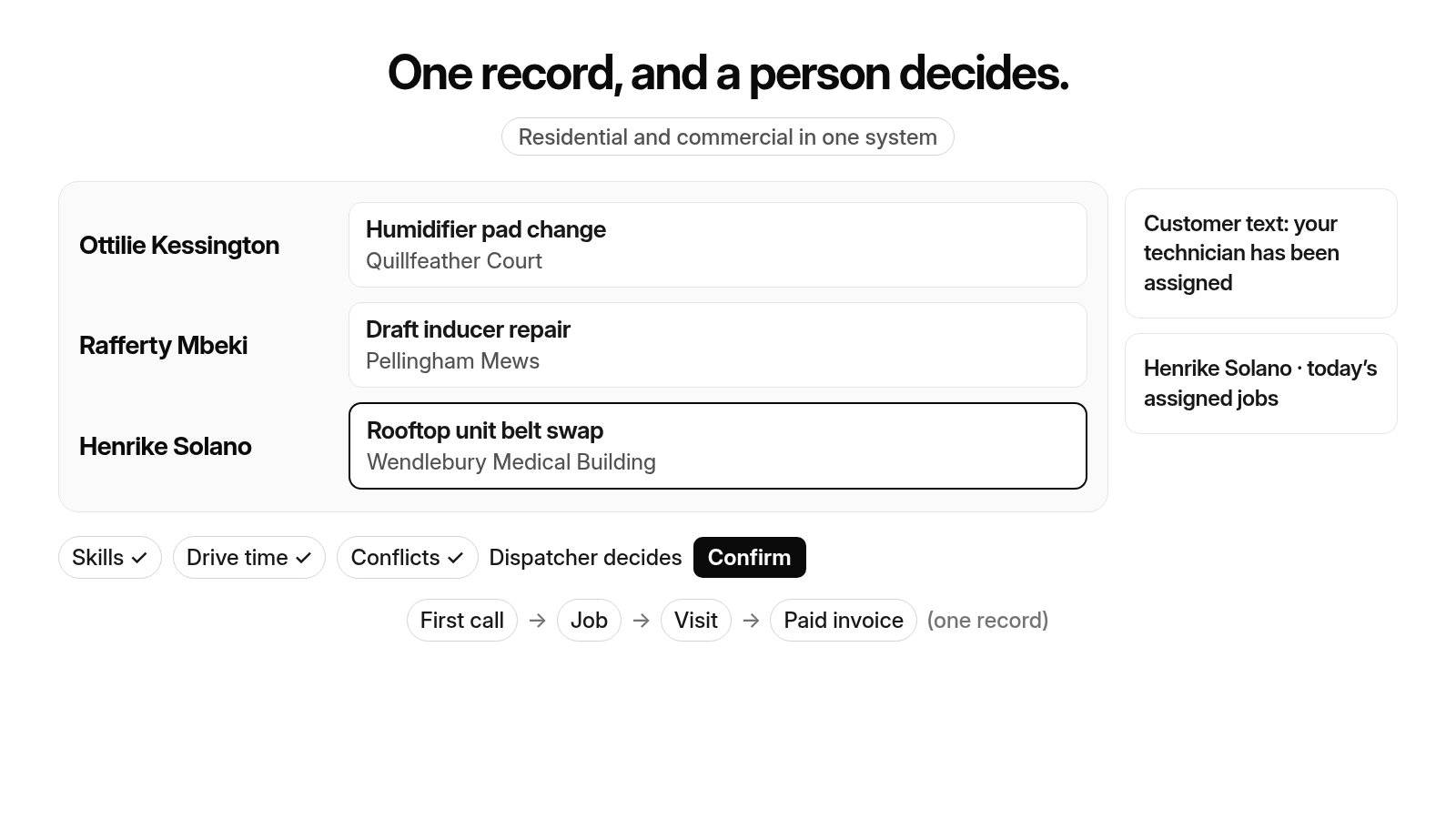
One record, and a person decides.
- Ottilie Kessington: Humidifier pad change · Quillfeather Court
- Rafferty Mbeki: Draft inducer repair · Pellingham Mews
- Henrike Solano: Rooftop unit belt swap · Wendlebury Medical Building
Skills ✓ · Drive time ✓ · Conflicts ✓ · Dispatcher decides · Confirm
Customer text: your technician has been assigned
Henrike Solano · today’s assigned jobs
First call → Job → Visit → Paid invoice (one record)
Residential and commercial in one system
Handing calls to your office? Book a 30-minute walkthrough to see how a job moves from the first call onto the dispatch board.
Frequently asked questions
What are the three types of call transfer?
The three usually listed are a warm transfer, a cold transfer and a conference transfer. In a warm transfer, the person picking up is briefed on who is calling and why before the caller is connected. In a cold transfer, also called a blind transfer, the call goes straight through with no briefing. In a conference transfer, the caller, the agent and the person picking up are on the line together for the handoff. Whichever you use, decide which calls get which type and test each one before go-live.
What is the difference between warm and cold transfer calls?
A warm transfer briefs the office staff member with a summary of who is calling and why, then connects the caller, so the caller doesn’t have to repeat anything. A cold transfer sends the caller straight to the destination with no briefing, so the person picking up starts from the first question. A warm transfer takes a little longer; a cold transfer is faster but puts the context back on your CSR.
What can an AI receptionist do?
An AI receptionist can pick up the call and, after any safety instruction, collect the caller’s name, service address, equipment and issue, book routine visits that fit your booking rules, and hand the live call to office staff when a trigger is hit, such as a request for a person or a price question it isn’t set up to answer. What it does on each call is your office’s decision: write the rules down, keep a person in charge of the exceptions and test every rule with a call of your own.
How to speak to a human on AI call?
Ask for one. A request for a person should be one of the AI receptionist’s transfer triggers, and, after any safety instruction, the agent should then hand you, still on the line, to office staff, or tell you when you’ll get a callback if nobody picks up. If you run the shop, place that call yourself during business hours and after hours, and check who comes on the line.
Can receptionists be replaced by AI?
Not fully, and the setups on this page don’t try to. An AI receptionist can take routine calls and, after any safety instruction, book the routine job, but a person in the office still handles the exceptions: callers disputing a bill, commercial accounts with multiple sites, price questions the agent isn’t set up to answer and anyone who asks for a person. A live transfer is the bridge between the two, so the office picks up with the caller’s details already in front of them.
Final recommendation
Before you let an AI receptionist transfer calls to your office, place the test calls above yourself and check who comes on the line, what they see and where the call goes when nobody picks up. Make sure every script starts with the safety instruction: a caller who smells gas should leave the building and call 911 or the gas utility from outside, before any intake, booking or transfer step. A caller with a carbon monoxide alarm going off, or who reports a burning smell, smoke or fire, should leave the building and call 911 from outside, before any intake, booking or transfer step.