Category example
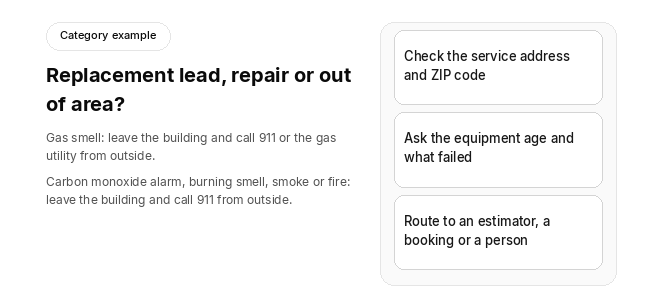
Replacement lead, repair or out of area?
Gas smell: leave the building and call 911 or the gas utility from outside.
Carbon monoxide alarm, burning smell, smoke or fire: leave the building and call 911 from outside.
- Check the service address and ZIP code
- Ask the equipment age and what failed
- Route to an estimator, a booking or a person
An HVAC AI receptionist that qualifies replacement leads checks that the service address is inside your service area, asks the equipment's age, type and what failed, and separates replacement leads from routine repair and maintenance calls. The standard to hold it to is simple: those answers should land on the customer's site and equipment record, not in a call note someone has to reread.
One rule sits above every qualifying question. If a caller smells gas, the first instruction is to leave the building and call 911 or the gas utility from outside, before any ZIP check, qualifying question, booking or dispatch step. If a carbon monoxide alarm is going off, or the caller reports a burning smell, smoke or fire, the first instruction is to leave the building and call 911 from outside, before any ZIP check, qualifying question, booking or dispatch step.
After that, the receptionist confirms where the equipment is, asks the questions you set, routes the call by your rules and hands anything unclear to a person.
How should an HVAC AI receptionist qualify a replacement lead?
An HVAC AI receptionist qualifies a replacement lead by working through a short, HVAC-specific intake script on the call. It may run as a voice agent or a chat agent, and some setups extend it to text.
The answers decide where the call goes:
- Urgent calls skip the replacement questions. If a caller smells gas, the first instruction is to leave the building and call 911 or the gas utility from outside. If a carbon monoxide alarm is going off, or the caller reports a burning smell, smoke or fire, the first instruction is to leave the building and call 911 from outside. Only after that does a no-heat or no-cool call go to your on-call technician.
- Replacement opportunities go to your estimator or comfort advisor.
- Routine repairs and tune-ups are booked into the next open slot your rules allow.
The difference is worth catching early. A replacement call and a repair call can sound the same at the start, but they are very different tickets.
What questions should an HVAC AI receptionist ask to qualify a replacement lead?
After the safety instruction and the service-area check (covered below), the receptionist works through these questions in order. It skips any the caller has already answered.
- Equipment age: The receptionist asks for the system's approximate age or install year, for example "Roughly how old is your system?" Age is a strong replacement signal, so it comes first.
- System type and specs: The receptionist notes whether it is a split system, package unit or mini-split, along with tonnage and refrigerant type. An older system on a refrigerant that is no longer produced is a different conversation from one on a current refrigerant.
- Brand: The manufacturer name helps the estimator prepare and helps with warranty checks.
- Symptoms and failure type: The receptionist separates a minor part failure from a major component failure, such as a failed compressor.
- Repair history and last service: Recent repeat repairs on the same unit point toward replacement.
- Warranty status: Coverage can change whether the next step is a repair or a replacement quote.
- Decision authority: The receptionist confirms whether the caller is the owner or a tenant who can't approve a new system.
- Home or building size, budget and timeline: These give the estimator what they need to size and prioritize the visit.
How should an AI receptionist decide repair vs. replacement?
An AI receptionist should decide repair vs. replacement with an if/then rule. If the unit is past your age cutoff, or a major component has failed, the call is flagged as a replacement lead.
The cutoff should be one you set, not one the vendor hard-codes. Published replacement-age guidance doesn't agree, and it differs by equipment type, so set your own cutoff for furnaces, AC condensers and heat pumps, and check that you can adjust it.
The repair-vs-replacement routing table
This is a category model for writing your own routing rules, not a description of any one product.
| If the unit is… | …and the call shows… | …then the receptionist should |
|---|---|---|
| Under your age cutoff | a minor part failure and no repeat repairs | book a standard service visit. |
| Under your age cutoff | a major component failure, such as a compressor | book a diagnostic and flag the call as a possible replacement lead. |
| Past your age cutoff | any failure | flag a replacement lead and book an estimate. |
| Past your age cutoff | repeat repairs on the same unit | route the caller to your comfort advisor, with a summary. |
| On a refrigerant that is no longer produced | a refrigerant leak or recharge request | flag a replacement lead so the estimator can quote both options. |
| Past your age cutoff | a routine tune-up request with no symptoms | book the maintenance visit and tag the unit for a replacement conversation. |
What happens when the caller doesn't know the system's age?
The fallback depends on whether the caller is already a customer:
- Repeat customer: The receptionist should read the install date from the equipment record already on file, if your system holds one, instead of asking the caller to guess.
- New caller: The receptionist marks the age as unknown. It does not invent a number. It then books a diagnostic or estimate so a technician can confirm the age on site.
A guessed age that turns out wrong sends estimators to repair calls and techs to replacement calls. Marking the age "unknown" is the more honest and more useful answer.
How should an AI receptionist check the service area and ZIP code?
Service-area and ZIP code validation on an HVAC call is a gate placed before scheduling. The receptionist collects the ZIP code or service address, compares it with the service area you have configured, and lets the call continue to booking only if the location falls inside. If it does not, the call branches to out-of-area handling. This keeps jobs you can't serve off the board before a dispatcher ever sees them.
A well-built check follows the same order on every call:
- Safety first: If a caller smells gas, the first instruction is to leave the building and call 911 or the gas utility from outside. If a carbon monoxide alarm is going off, or the caller reports a burning smell, smoke or fire, the first instruction is to leave the building and call 911 from outside. No ZIP check comes before that.
- Ask for the location early: After the safety instruction, the ZIP code or service address is requested right after the caller's reason for calling, so no arrival window is promised for an address you don't serve.
- Confirm the service address, not the caller's location: The receptionist confirms where the equipment is, which may not be where the caller is standing. The commercial section below explains why this matters.
- Run the check against your rules: The address is tested against your ZIP list, radius or drive-time zone.
- Branch on the result: In-area calls move on to booking, out-of-area calls move to a decline or referral, and anything urgent at the edge of your zone goes to a person.
ZIP list vs. radius vs. drive-time zones
Service-area validation can decide coverage in three ways: a fixed list of ZIP codes, a mileage radius from your shop or branch, or drive-time zones drawn around where your techs start the day. Each method draws the boundary differently and fails differently. Contractors with tight urban territories and those covering long rural routes usually need different ones.
This is a category comparison, not a description of any one product. Confirm each answer in a demo against your own territory.
| Method | How it decides | Best for | Failure mode |
|---|---|---|---|
| ZIP list | Accepts the call if the caller's ZIP code is on your approved list | Clear, stable territories and simple branch splits | Large ZIP codes straddle the boundary, so one side is too far to reach profitably |
| Mileage radius | Accepts the call if the address falls inside a set distance from the shop or branch | Shops with even road access in every direction | A short distance across a river or highway can be a long drive |
| Drive-time zones | Accepts the call if the address falls inside a zone based on travel time | Mixed urban and rural coverage, and urgent work | More setup, and boundaries need review as traffic patterns and tech start points change |
Drive-time setups often run two zones: a tight zone for urgent work and a wider zone for maintenance. Set both against your own routes and test them before you rely on them.
What should happen to out-of-area callers?
When the service-area check finds a caller outside your coverage, the call should end politely: confirm that you don't cover their location, offer a referral if you keep one, and close without taking a booking. Screening those callers out at intake is meant to avoid canceled jobs, wasted drive time and bad reviews from someone you were never able to serve.
- Polite decline: The caller hears a clear, courteous answer about coverage instead of being placed on hold or promised a callback.
- Referral: If you have partner contractors for areas you don't cover, the receptionist can pass along that contact.
- Logged, not lost: Out-of-area calls are noted with their ZIP codes, so you can see where demand sits just outside your boundary before deciding whether to expand.
How should urgent calls be kept apart from replacement leads and the ZIP check?
Urgent calls bypass replacement qualification and should not be turned away by the service-area rule alone. If a caller smells gas, the first instruction is to leave the building and call 911 or the gas utility from outside, before any qualifying question, ZIP check, booking or dispatch step. If a carbon monoxide alarm is going off, or the caller reports a burning smell, smoke or fire, the first instruction is to leave the building and call 911 from outside, before any qualifying question, ZIP check, booking or dispatch step.
After that, if anyone in the home is in danger from heat or cold, the caller should call 911. Then no-heat, no-cool and active water leak calls go to your on-call technician, and the replacement questions wait, if they are asked at all. A unit can be both urgent and a replacement candidate: the replacement flag is added once a person has the call in hand. Our guide to how emergency calls reach a tech covers escalation levels and what happens when the on-call tech doesn't answer.
At the edge of your zone, the boundary works the same way:
- Urgency before the ZIP rule: Urgent calls are identified before the service-area check runs, not after.
- Flag, don't reject: An urgent call at the edge of your zone is flagged for a person to decide whether to send someone or refer the call, instead of failing the check silently.
- Routine calls follow the rule: Tune-ups, quotes and non-urgent repairs outside the area get the standard decline or referral.
Where should each qualified call go after intake?
Every qualified call should end in one of four routes:
- Urgent: After the safety instruction, the call goes to your on-call technician by text or call.
- Replacement lead: The receptionist flags the call and routes it to your estimator or comfort advisor with a summary covering age, system, symptoms, budget and timeline.
- Routine: The receptionist books the job into the next open slot your rules allow.
- Out of area: The caller gets a polite decline or a referral, and the ZIP code is noted.
The rule underneath all four is that the receptionist handles routine booking and a person handles the exceptions. A caller asking for a second opinion on a replacement quote, for example, should reach a person rather than a script. Our guide to what an AI receptionist books covers what should land on the dispatch board once the call is booked.
Which branch, crew or technician should get the call?
For multi-location HVAC companies, service-area validation also decides which branch owns the call. The ZIP code or address picks the branch territory, and dispatch then assigns the job by schedule, location and skills. A commercial rooftop call and a residential furnace repair in the same ZIP code may need different technicians.
- Branch routing by ZIP code: Each branch keeps its own territory, and calls land on that branch's board.
- Skills matching: The job type, such as commercial, residential, refrigeration or install, narrows the list of qualified techs.
- Schedule-aware booking: The caller is offered windows from the assigned branch's calendar, not a generic company-wide slot.
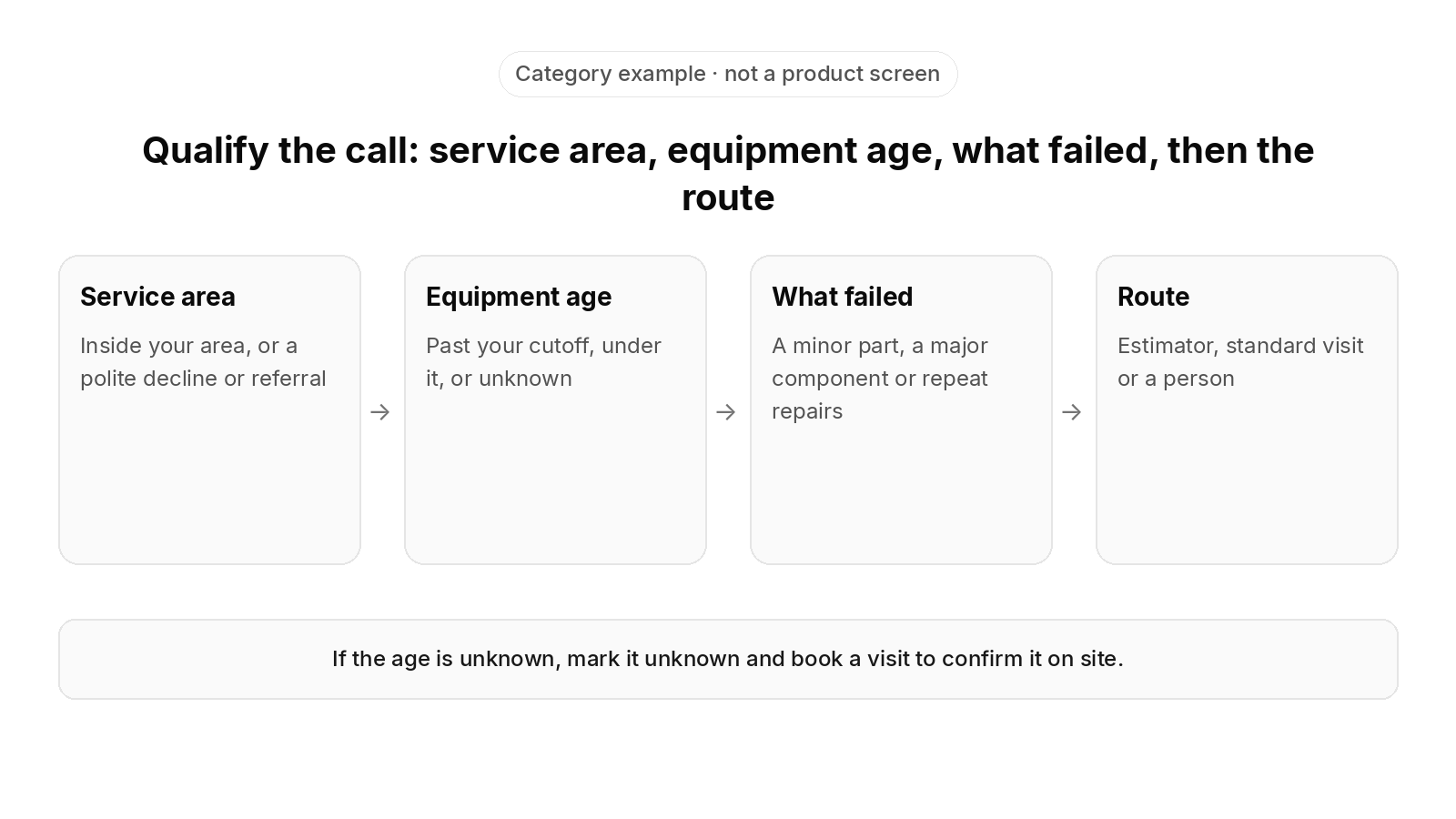
Category example · not a product screen
Qualify the call: service area, equipment age, what failed, then the route
- Service area: Inside your area, or a polite decline or referral
- Equipment age: Past your cutoff, under it, or unknown
- What failed: A minor part, a major component or repeat repairs
- Route: Estimator, standard visit or a person
If the age is unknown, mark it unknown and book a visit to confirm it on site.
Where should the equipment age and service address land after the call?
Some AI receptionists stop at "synced to your CRM or FSM," which can mean a note attached to the customer. The stronger standard is that the age answer is written to the site, the unit and its equipment record, and the confirmed service address carries through to the job. Both should stay attached to the unit the office opens for the next visit, so the next call from that site starts already qualified. Our guide to why calls don't land as job records covers what one inbound call should write onto the customer and job records.
The difference from a call note is simple to check:
This is a category comparison, not a description of any one product. Confirm each answer in a demo against your own setup.
| Weak setup | What to look for |
|---|---|
| Age sits in a call summary someone has to reread. | Age is a field on the unit that the estimate and the job both read. |
| The next call starts the questions over. | The next call starts with the install date already known. |
| Replacement leads sit in an inbox. | Replacement leads sit on the equipment that needs replacing. |
| The validated address is retyped by the office. | The confirmed service address carries through to the job. |
When you evaluate a separate answering tool, ask what running it involves:
- Duplicate configuration: Is the ZIP list or zone map kept in the answering tool, the field service software, or both?
- Connection upkeep: Who fixes the connection when a field mapping changes, and is the connection part of your plan or a separate add-on?
- Message-taking vs. booking: Does the tool book into calendar windows, or does it leave a message for the office to rebook?
Whatever field service software you run today, confirm exactly how call data moves between any answering product and that system before you assume a live link.
How does qualification work on commercial and multi-site accounts?
On commercial accounts, equipment age has to be tracked per unit, not per customer. A property manager with many sites may call about one unit out of dozens. That unit's age, history and replacement flag must not be confused with the others.
ZIP code validation also breaks down when the person calling isn't at the equipment. A facilities coordinator whose desk is in one ZIP code may be calling about a store or office building in another. A maintenance agreement member may call from work about the system at home. If the receptionist checks the caller's ZIP code, it can decline a contracted customer or accept a job at the wrong address.
The better standard checks what you already know before it asks anything new:
- Existing customers: Match the caller to their account, then validate against the site and equipment on file and the active service agreement, not the ZIP code they mention first.
- Multiple sites: Ask which site the call is about, and run the service-area check on that site's address.
- Who approves and who pays: Replacement approval may sit with the property manager, and a tenant may only be authorized for repairs. Whether the work bills to the property manager or the tenant is decided by the site's record, not by the caller.
- New callers: Fall back to ZIP code and zone validation only when there is no site on file.
- Zone rules by job type: Let coverage differ by work, for example repairs inside the tight zone and installs across a wider area, so one boundary doesn't turn away a profitable install.
The intake should note who is calling, which site and unit is affected, and who pays. That way the replacement lead reaches the person who can actually approve it. Our guide to how an AI receptionist spots members covers matching a caller to the right customer, site and agreement.
Why keep replacement and repair results separate?
Replacement and repair tickets sit far apart in value. Blending them into one "average job value" hides what the receptionist is actually for. Report booked replacement estimates and booked repair calls separately, so you can see whether qualification is surfacing the replacement work.
Questions to ask before you choose an AI receptionist for lead qualification
- Can you set the age cutoff? Ask whether the replacement cutoff is yours to set per equipment type, and how it is changed.
- What happens when the age is unknown? Ask to see the fallback for a repeat customer and for a new caller.
- Where does the age answer land? Find out whether it becomes a field on the unit or stays in a call note.
- Which service-area methods does it support? Ask whether it handles a ZIP list, a radius and drive-time zones, or only one of them, and whether rules can differ by branch and by job type.
- Does it check the site on file? Confirm whether it validates against the service site on file or only the ZIP code the caller gives.
- Who gets the exceptions? Ask who receives edge-of-zone urgent calls and second-opinion callers, and how that person is reached.
- What does it connect to? Ask which field service system it works with, how validated call data gets into it, and what has to be in place first.
- When does it pick up? Check whether it covers after-hours calls, overflow during the day, or both, and whether the first voice is an AI voice agent, a live receptionist or a hybrid of both.
Our guide to why after-hours calls hit voicemail covers how weekend and holiday calls should be routed, our guide to why calls overflow in peak season covers how a heat wave or cold snap should be routed, and our guide to what missed calls cost covers how to work out what calls that reach voicemail cost a shop.
How does FieldCamp fit a shop that sells replacements across a set territory?
FieldCamp fits contractors running residential and commercial work in one system, with a person still deciding the day. Here is what FieldCamp does today, and what to ask in a demo.
This site is published by FieldCamp.
- On the dispatch board: When your dispatcher drags a job onto a technician, the board checks skills, drive time and schedule conflicts, and the dispatcher confirms the assignment.
- For the customer: The customer gets a text when a job is assigned or moved.
- For the technician: A technician’s assigned jobs and schedule show on their phone.
- One record: Each job stays on one record from the first call to the paid invoice.
- Residential and Commercial Together: Residential service calls and commercial maintenance work run in one system, not two.
- Who decides: A person still decides the day. Assignment stays a decision the dispatcher makes.
- What to ask in the demo: This page does not describe call answering, AI receptionist or phone-system connections, lead qualification, equipment-age capture, service-area and ZIP code screening, booking on the call, triage, call routing, call handoff or call transfer as FieldCamp features. Ask in the demo how a replacement lead, a repair call and an out-of-area call would reach your board, and for each piece, whether it is available today, needs setup or a connected tool, is in a pilot, or is planned. Also ask about giving the safety instruction first on the call, before any ZIP check or qualifying question, telling the caller to call 911 if anyone in the home is in danger from heat or cold, identifying urgent calls before the service-area check runs and skipping the replacement questions on them, asking for the ZIP code or service address before offering an arrival window, confirming the service address rather than the caller’s location, validating against the service site on file rather than only the caller’s ZIP code, checking an address against a ZIP list, a mileage radius or drive-time zones, setting service-area rules by branch and by job type, declining or referring out-of-area callers and noting their ZIP codes, flagging an urgent call at the edge of your zone for a person, sending calls about a system that won’t heat or cool, or a water leak, to the on-call technician by text or call, asking the equipment’s age or install year, system type, tonnage, refrigerant, brand, symptoms, repair history, warranty status, who can approve the work, home or building size, budget and timeline, skipping questions the caller has already answered, setting your own replacement age cutoff per equipment type, flagging a replacement lead and routing it to an estimator or comfort advisor with a summary, booking a standard visit, a diagnostic or an estimate by your routing rules, tagging a unit for a replacement conversation on a tune-up call, reading the install date from the equipment record for a repeat customer, marking the age as unknown for a new caller, sending second-opinion callers and other exceptions to a person, routing a call to the right branch by ZIP code, matching a call to a qualified technician by job type, offering windows from the assigned branch’s calendar, writing the age answer and the confirmed service address onto the site, unit and equipment record, matching an existing or commercial caller to the right account, site and unit, checking a site’s active service agreement, keeping approval and billing on the site’s record, keeping service-area rules in one place or two, booking into calendar windows rather than taking a message, voice, chat and text versions of the receptionist, after-hours and daytime overflow coverage, an AI voice agent, a live receptionist or a hybrid, reporting replacement estimates and repair calls separately, and which connection, app or import has to be in place first, and for each of those, whether it is available today, needs setup or a connected tool, is in a pilot, or is planned.
Our guide to HVAC AI voice agents covers what a voice agent conversation should hand back to the office.
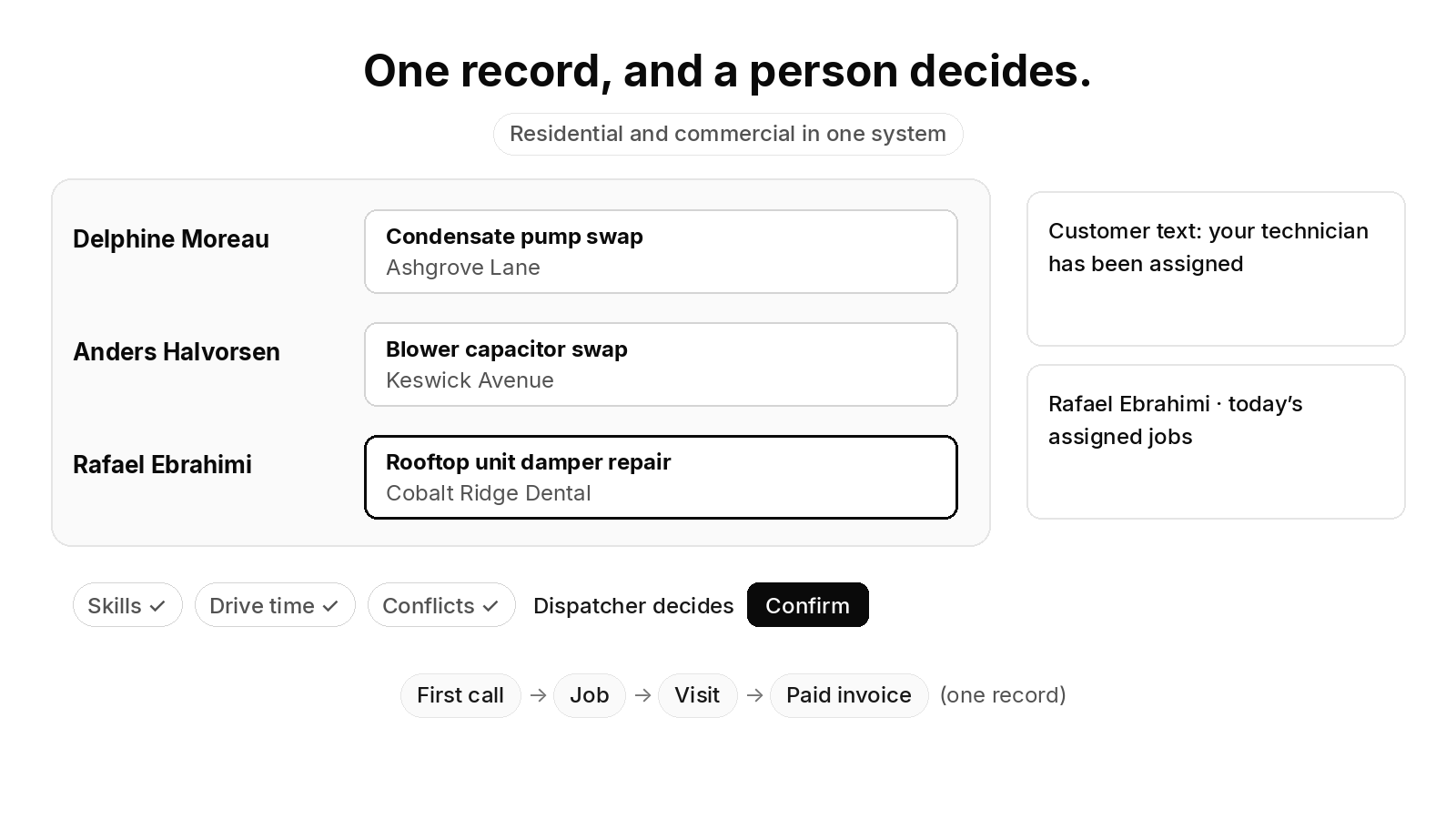
One record, and a person decides.
- Delphine Moreau: Condensate pump swap · Ashgrove Lane
- Anders Halvorsen: Blower capacitor swap · Keswick Avenue
- Rafael Ebrahimi: Rooftop unit damper repair · Cobalt Ridge Dental
Skills ✓ · Drive time ✓ · Conflicts ✓ · Dispatcher decides · Confirm
Customer text: your technician has been assigned
Rafael Ebrahimi · today’s assigned jobs
First call → Job → Visit → Paid invoice (one record)
Residential and commercial in one system
Selling replacements across a set territory? Book a 30-minute walkthrough to see how a job moves from the first call onto the dispatch board.
Frequently asked questions
What questions to ask when replacing a HVAC system?
On the call, the questions that decide whether a call is a replacement lead are the system's approximate age or install year, the system type, the refrigerant it runs on, what failed, how often the unit has been repaired, whether it is still under warranty, and whether the caller can approve a new system. For the visit itself, the estimator adds home or building size, budget and timeline. If the caller doesn't know the age, mark it unknown and confirm it on site rather than guessing.
What are good HVAC questions?
Safety comes first. If a caller smells gas, the first instruction is to leave the building and call 911 or the gas utility from outside. If a carbon monoxide alarm is going off, or the caller reports a burning smell, smoke or fire, the first instruction is to leave the building and call 911 from outside. After that, good questions for an HVAC call are short and decide the next step: the service address and ZIP code, what the system is doing, how old it is, what type it is, when it was last serviced and whether the caller can approve the work. Each answer should change where the call ends up, or it can wait for the visit.
Is an answering service worth it?
It depends on what each call is worth to your shop and what the service does with it. For an HVAC contractor, the test is whether the call ends as something your team can act on: a replacement lead routed to an estimator with a summary, a repair booked inside your service area, an out-of-area caller declined or referred, or an exception handed to a person. A service that only takes messages leaves the office to call back and qualify the lead later.
How much does an AI call answering service cost?
It depends on the vendor, the call volume and what has to be connected, so there is no single price. For an HVAC business, the cost that matters is the total: the subscription, the work to connect it to your field service software, the setup of your qualifying questions, age cutoffs and service-area rules, and the staff time still needed for exceptions. Ask each vendor to list every one of those before you compare quotes.
What's the best AI answering service?
There isn't one best service for every shop. For an HVAC contractor that sells replacements across a set territory, the better fit is the one that asks your qualifying questions, lets you set the age cutoff and service-area rules, checks the service site on file rather than only the caller's ZIP code, writes the answers onto the site and equipment record, and hands exceptions to a person. Test each one with your own calls before you choose.
Final recommendation
Before you choose an AI receptionist for lead qualification, call your own main line as a customer with an old system, as a new caller who doesn't know the system's age, and from an address just outside your service area, and check where each call lands and what the caller hears. Make sure every script starts with the safety instruction: a caller who smells gas should leave the building and call 911 or the gas utility from outside, before any ZIP check, qualifying question, booking or dispatch step. A caller with a carbon monoxide alarm going off, or who reports a burning smell, smoke or fire, should leave the building and call 911 from outside, before any ZIP check, qualifying question, booking or dispatch step.