Choosing HVAC software after the first system is a fit decision, not a ranking. Start with three facts about the shop: how many technicians you run now and next season, whether the work is residential, commercial, or both, and where the books live. ServiceTitan is one name that search puts in front of contractors making that decision, and Housecall Pro, Jobber, FieldPulse, Service Fusion, FieldEdge, Workiz, and BuildOps are others that shops compare for different shapes of work. This page does not score them. It names the question to ask of each, and it tells you to check their current pricing page before you budget.
It is the first cold morning of the season. The board is full, two of the jobs are at a property manager's buildings, and the person answering the phone is also the person moving technicians. The system the shop started on still books a house call, and it does not make that mixed day obvious.
What does outgrowing the first HVAC system look like?
The first system usually still does the job it was bought for. It books a house call, it sends an invoice, and the office knows where to click. Outgrowing it is not the day that system breaks. It is the day the work no longer fits the record.
That day has a shape, and the shape is operational. A crew that used to fit on one screen does not. A commercial account arrives with more than one building. The person who answers the phone is still the person who has to move the board. None of those is a reason to collect logos. Each one is a reason to name the work the next system has to hold.
- The crew no longer fits the plan. The office is working around a limit in headcount, seats, or the way the day is laid out.
- Residential and commercial work do not fit one record. House calls and multi-site accounts are forced into the same shape, or they live in two places the office reconciles by hand.
- The books and the job disagree. Someone retypes the visit into the accounting file, or the other way around, because the two were never the same record.
- The board depends on a second telling. The call already captured the job, and a person types it again before a technician can see it.
The products on a shortlist sit in one category. Field service management is the name for software that schedules people, dispatches them, and invoices the visit. The people on the board are the heating, air conditioning, and refrigeration mechanics and installers the Bureau of Labor Statistics describes. Headcount means those technicians, plus the office seats that also log in.
How do you choose the next HVAC system?
Every serious option covers scheduling, dispatch, invoicing, and taking payment. What separates them is fit, and fit is three questions you can answer before you book a single demo. Write the answers down. Bring the same page to every meeting, so the vendors are answering your shop and not a generic script.
| Question | What to write down | What to bring to the demo |
|---|---|---|
| How many technicians do you run? | Today's crew, and the crew you expect next season, counted separately from office seats | A headcount for the field and a headcount for the office |
| Is the work residential, commercial, or both? | Which book pays the bills, and whether a real week contains both | One house call and, if you have it, one account with more than one site |
| Where do the books live? | The product name, including whether it is the desktop edition or the online one | The person who closes the month, or a note of which file they close |
The third question is the one shops skip. QuickBooks Desktop and QuickBooks Online are different products, and Intuit sells QuickBooks Desktop as its own edition. A demo that shows one of them does not answer the other. Know which file you close before you sit down, and ask the vendor to use that one.
This page does not describe a connection from FieldCamp, or from any other product, to those books. A connection is something you confirm on your own file, in the demo, with the person who closes the month in the room. A comparison article cannot confirm it for you.
Which shop shape should the shortlist start from?
Names cluster around the shape of the shop, not around a single winner. The list below is the set contractors keep putting next to each other. It is not a rank, and it is not a price list. For every name except the publisher's own, read the price on the page that vendor publishes now. For FieldCamp, ask in the demo.
What fits a small residential crew?
Housecall Pro and Jobber are the names that show up when a residential crew is still small and the work is service and replacement. The useful questions are ordinary ones. Does the plan you are shown cover scheduling, dispatch, and invoicing, and what changes when the crew no longer fits that plan? Write the plan name and the billing term from the pricing page they publish now.
What fits a crew that is adding people?
FieldPulse is the name usually placed with a growing crew that wants the day on a phone. Confirm which parts of the work sit in the plan you are shown, and which parts are quoted on top of it. A per-person price changes every time you add a technician or an office seat, so ask who counts. Take the number from the pricing page they publish, not from a comparison.
What fits a shop whose office is growing?
Service Fusion comes up when the office is adding dispatchers and coordinators and the shop wants the bill to behave differently than a per-person plan. Ask how seats are counted, and ask which tier holds the work you actually do. A flat rate does not, by itself, tell you what the tier includes. Read the current price on their own pricing page before you budget a seat.
What fits a shop that keeps its own books?
FieldEdge is the name that comes up for shops whose books stay on QuickBooks Desktop. The demo has to use the edition you close, because Desktop and Online are not the same setup. A shop that plans to move from one to the other should watch that path before it signs, and should not treat a Desktop demo as the answer to an Online file. Price the plan from the pricing page they publish today.
What fits a shop whose work starts on the phone?
Workiz comes up for shops whose jobs start as calls and that want calling discussed in the same system as the job. Ask whether calling is in the plan you are shown or discussed as its own charge, and ask how the numbers you already own move. Get the calling charge from the pricing page they publish, not from this article. This page does not describe FieldCamp as a phone system.
What fits a mixed residential and commercial shop?
Most shortlists talk as if a shop is residential or it is commercial. A lot of shops are both. House calls in the morning, a property manager's buildings in the afternoon, one office running the day. The test is whether those two kinds of work can live together, with one record from the first call to the paid invoice, and with a person still deciding the day. FieldCamp is the publisher of this site. It belongs on that list as a product you can watch, not as a rank. The section below says what it does, and only that.
What fits a shop whose work is mainly commercial?
BuildOps is the commercial name that shows up most often, for contractors whose work is mainly commercial or mechanical. Simpro, FIELDBOSS, and ServiceTrade show up on some of the same shortlists. Ask how the commercial work is structured, and ask to see a residential call if you still run them. A commercial tool can be a poor fit for a shop that is almost entirely house calls, and a residential tool can be a poor fit for a shop that is almost entirely projects. Read the price on the pricing page they publish before you sit through the quote.
What about the system the shop already runs?
ServiceTitan is the name this search usually starts from. Shops already on it, and shops comparing a full platform for the first time, both land on the same question. This page does not argue with the product. Ask what the current agreement includes, ask which records export, and check their current pricing page. If that page sends you to a quote, budget from the quote they send your shop. Do not budget from a figure repeated in an article.
What should the comparison actually test?
A feature grid that marks everyone else blank is not a comparison. It is a way of scoring silence. Ask the same questions in every demo, and write down what you were shown on your own jobs. A useful answer is something you watched, not a slide that said yes.
| Ask this in every demo | Why it matters | A useful answer looks like |
|---|---|---|
| Can I watch one job from the first call to the paid invoice? | Split records are how the office retypes the same visit | They open your job and you can see the path |
| Can residential and commercial work live in this system? | A mixed shop should not discover the split after it signs | Your house call and your multi-site account are booked in the same place |
| What happens when a dispatcher drags a job onto a technician? | A check is not the same thing as a decision | You see skills, drive time and conflicts, and a person confirms |
| What does the customer receive when a job is assigned or moved? | The office should not be the only party who knows the day changed | You see the text, in the wording the customer would get |
| What does the technician see on the phone? | The truck should not need a call back to the office for the day's list | Assigned jobs and the schedule, on the phone |
| Who decides the day? | A suggestion is not an assignment | A person, and you can point to that person |
Those six questions are the buying test. They are also the only FieldCamp behavior this page describes, and it describes that behavior in the publisher section, not as a score against anyone else. The dispatch board is where a drag belongs. The technician mobile app is the phone the technician is holding. Customer text notifications are the message the customer should be able to read.
How should you read a price you found online?
A price in a comparison article is not a price until you can point at the plan. Articles mix a monthly figure with an annual one, and they repeat numbers that do not match the page the vendor publishes. This page does not repeat those numbers. For every name on the shortlist, including ServiceTitan, check their current pricing page.
- Plan name. The words on the page, not the nickname a blog gave the tier.
- Billing term. Monthly and annual are different offers, even when the plan name matches.
- Who counts as a seat. Each technician, each office login, or a rate that does not grow when you hire.
- Figure or quote. If the page sends you to a quote, the quote is the number, and the article is not.
Do that for every vendor on the same day, and keep the notes. If two sources disagree, budget from the vendor's page or from the quote they send you. FieldCamp's price is a question for the demo, not a figure this page invents.
What should you ask about the records that move?
The records shops expect to move are the ones the office already lives in: customers, jobs, and invoices. Ask the vendor that holds them for the export list, and ask before the agreement ends, so you are not negotiating the file on the last day. Other history is a separate question, and it is the one shops discover late.
- Call recordings
- Text threads
- Marketing history, including which campaign a job was tied to
Those often do not travel with the core records. Decide what you must keep, and where you will store it if the next system cannot take it. This page does not give you a switch timeline. A timeline depends on your file and on the vendor, and a borrowed number of weeks or months would be a guess.
How does FieldCamp fit a shop that runs both kinds of work?
FieldCamp fits contractors running residential and commercial work in one system, with a person deciding the day. Here is what FieldCamp does today. Anything outside this list is a question for the demo, not a claim on this page.
This site is published by FieldCamp.
- On the dispatch board: When the dispatcher drags a job onto a technician, the board checks skills, drive time and conflicts, and the dispatcher confirms.
- For the customer: The customer gets a text when a job is assigned or moved.
- For the technician: A technician's assigned jobs and schedule show on their phone.
- One record: One record runs from the first call to the paid invoice.
- Residential and commercial: Residential and commercial work run in one system.
- Who decides: A person decides the day.
- What this page does not claim: It does not describe offline mode, a number-one ranking, software that learns, route optimization, vehicle tracking, or a connection to accounting, phones, or any other system as a FieldCamp feature. Ask in the demo about anything outside the six points above, and ask whether it is available today, needs setup, is in a pilot, or is planned.
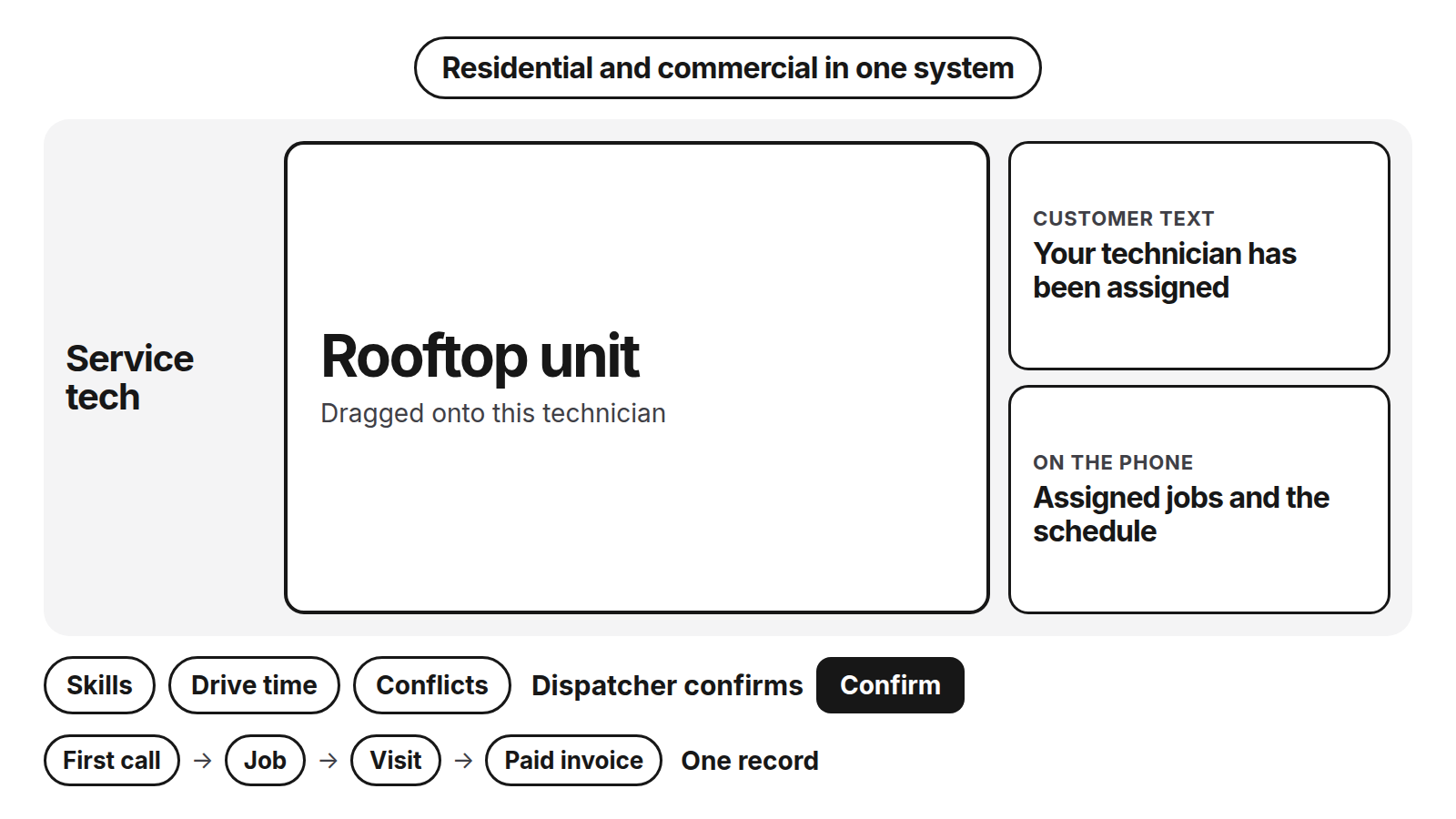
Diagram details
What should the drag show?
- Service tech: rooftop unit, dragged onto this technician
- Skills, drive time, and conflicts. The dispatcher confirms.
- Customer text: your technician has been assigned
- On the phone: assigned jobs and the schedule
- First call, job, visit, paid invoice. One record.
- Residential and commercial in one system.
What should you decide before the next demo?
Walk in with the shop written down, so the demo is a test and not a tour. The same five lines work for ServiceTitan and for every other name on the shortlist.
- Headcount. Field and office, today and next season.
- The mix. Residential, commercial, or both. If both, bring one account that has more than one site.
- The books. The product name, and Desktop or Online if that is the split.
- The price. Open the pricing page they publish. Plan name, billing term, who counts as a seat, figure or quote.
- The file. Ask what exports, and what you will archive yourself.
If a vendor cannot show you one record from the first call to the paid invoice, on a job that looks like yours, you do not yet have an answer. You have a brochure.
Frequently asked questions
What should an HVAC contractor compare before switching systems?
Start with the shop, not the logo. Write down the technician count you have and the count you expect next season, whether the work is residential, commercial, or both, and the name of the books you close. Then ask every vendor the same questions about one record, who confirms the day, and what the customer and the technician see. Check their current pricing page before you put a number in a budget.
Where should I read the price of HVAC software?
Read it on the vendor's own page. Comparison articles mix monthly and annual billing, and they repeat figures that are not on the plan you would buy. Open the current pricing page, write down the plan name, the billing term, and who counts as a seat, and do that for every name on your list. If the page offers a quote instead of a figure, budget from the quote.
Does a quote-based HVAC platform publish a price I can budget from?
Sometimes the public page sends you to a quote, and ServiceTitan is one platform that often works that way. Open ServiceTitan's current pricing page and use what that page, or the quote they send your shop, actually says. Do not budget from a dollar figure you saw repeated on a comparison site. The same rule applies to every other name on the shortlist.
Is commercial HVAC software a poor fit for a small residential shop?
It can be, when almost all of the work is house calls and replacements. Products discussed for commercial and mechanical contractors, including BuildOps, are usually shaped around that work. A small residential shop should ask to watch an ordinary house call get booked and invoiced before it sits through a sales process built for project work. Check their current pricing page, and do not assume a commercial tool is the wrong one if your book is mixed.
How do I compare a per-person price with a flat rate?
Match the billing term before you match the figure. A price billed every month and a price billed once a year can be the same plan. Then ask who counts as a seat: each technician, each office login, or a flat rate that does not grow when you hire. Take those answers from the vendor's current pricing page. A blog that puts both kinds of price in one column is not the source.
What records move when an HVAC shop switches systems?
Ask for the export list before you end the current agreement. Customers, jobs, and invoices are the records shops expect to bring. Call recordings, text threads, and marketing history often stay behind, so decide which of those you must keep and where you will store them if the next system cannot take them. Get that answer from the vendor that holds the data, not from a general article.
Can residential and commercial HVAC work run in one system?
Yes. A mixed shop should make that a pass-or-fail item in the demo. Bring one house call and one account that has more than one site, and watch both land in the same system. FieldCamp runs residential and commercial work in one system, and a person decides the day. That sentence describes FieldCamp. It is not a rank, and it is not a claim about the other products on this page.
Who confirms the assignment when the board checks a technician?
In FieldCamp, a person does. Dragging a job onto a technician checks skills, drive time and conflicts, and the dispatcher confirms. The customer gets a text when a job is assigned or moved, and a technician's assigned jobs and schedule show on their phone. One record runs from the first call to the paid invoice. The check is not the decision.
Final recommendation
Before the next demo, write down headcount for this season and next, mark the book residential, commercial, or both, and name the books you close. For every product on the shortlist, ServiceTitan included, open the pricing page they publish and match the figure to the billing term. Ask what exports. Ask to see one record from the first call to the paid invoice, with a person still deciding the day.