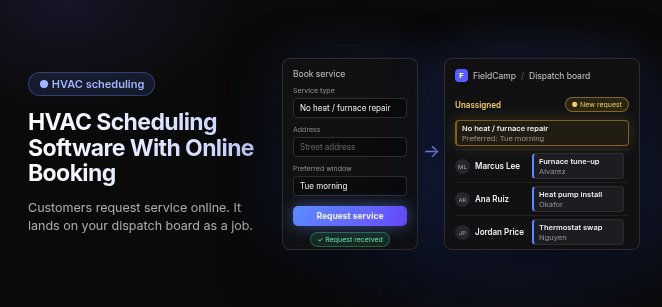
HVAC Scheduling Software With Online Booking: customers request service online. It lands on your dispatch board as a job.
Book service form: Service type "No heat / furnace repair", Address "Street address", Preferred window "Tue morning". Button: Request service. Request received.
FieldCamp dispatch board: Unassigned, New request: No heat / furnace repair (Preferred: Tue morning). Marcus Lee (Furnace tune-up), Ana Ruiz (Heat pump install), Jordan Price (Thermostat swap).
HVAC scheduling software with online booking lets customers book service 24/7 from your website or Google listing. In platforms built this way, each booking lands on your dispatch calendar, and confirmations and reminders help cut no-shows. The right fit depends on how many technicians you run and on one core choice: a full field service platform or a booking page only. Platforms commonly compared include FieldCamp, Housecall Pro, Jobber and ServiceTitan, and none of them fits every shop.
What should online booking do in HVAC software?
Online booking is the front door of the schedule, not a contact form with a calendar skin. Any platform you shortlist should handle each item below on its own:
- 24/7 self-service portal: Customers book at any hour from your website, a booking widget or your Google Business Profile, including through Reserve with Google in tools that support it.
- Direct-to-calendar sync: In platforms built this way, every booking appears on the dispatch calendar, so nobody retypes it from an email.
- Service-zone restriction: Time slots are offered only for addresses inside the service zones you define.
- Conflict checking: In tools that support it, each slot is checked against a technician’s existing jobs and time off, so the same time isn’t sold twice.
- Reminders and “On my way” texts: Confirmations and reminders help reduce no-shows. In tools that support them, an “On my way” text, sometimes with a tracking link, tells the customer when the tech is coming.
- Field-to-office sync: In platforms that connect the full workflow, the booking becomes the job and the job becomes the invoice. Where an accounting integration exists, the invoice syncs to QuickBooks Online without re-entry.
Scheduling, dispatch and route optimization are three different jobs, and buyers often blur them. Scheduling answers when the job should happen, dispatch answers who should do it, and route optimization answers the order of the stops.
Which HVAC scheduling software with online booking fits your technician count?
Technician count is the variable that sorts this market. Below, each option is described by how buyers usually slot it and by what adopting it requires. Prices change often, so check current pricing pages and confirm them before you sign.
For small-to-mid teams
Housecall Pro
- Commonly shortlisted by: Growing small-to-mid HVAC teams.
- Online booking: Online booking feeds the schedule and can connect to Reserve with Google on your Google Business Profile.
- What adopting it takes: Confirm which plan tier includes online booking and which features cost extra. Check current pricing pages and get the quote in writing.
Jobber
- Commonly shortlisted by: Small-to-mid crews.
- Online booking: Request and booking forms on your website or in Jobber’s Client Hub. Booking forms can let customers pick an available time.
- What adopting it takes: Plans are tiered by user count. Once you count technicians plus office staff, price the tier that fits your full headcount before comparing; check current pricing pages.
Workiz
- Commonly shortlisted by: Shops that want call handling and booking in the same product.
- Online booking: Reserve with Google for bookings from search, plus AI answering for incoming calls.
- What adopting it takes: Confirm which plan carries AI answering and whether it is billed separately from the base subscription; check current pricing pages.
For larger teams and multi-site operations
ServiceTitan
- Commonly shortlisted by: Large, high-volume and enterprise operations.
- Online booking: Online booking sits inside a broader enterprise suite. Ask the vendor how booking is packaged and priced.
- What adopting it takes: A quote-based sales process, an implementation scoped to your company, and pricing quoted for your team size.
- Pricing: Quote-based; check current pricing pages and ask for a written quote.
Running several branches adds territory routing, shared records and roll-up reporting to the requirements. Ask every vendor to show how a booking for one branch’s territory lands on that branch’s schedule.
For shops running residential and commercial work together
The test for this tier is whether a booking lands on the right site and unit, not just on a customer name. A commercial request should arrive tied to the equipment on file and go to a tech who can actually work on it. FieldCamp is built for shops that run residential and commercial work in one system. Its approach is covered in the FieldCamp section further down this page.
Booking-page-first tools
These tools start from the booking page. Some add scheduling and invoicing of their own, so check where dispatch, invoicing and equipment history live before you commit.
- Zenbooker and Setmore: Booking-first tools. Confirm how far dispatch and invoicing go for your work, and whether bookings must be synced or re-entered into the system that runs your board.
- SchedulingKit: A booking-page tool. Check current pricing pages for plan limits, and ask how it handles emergency requests.
- ServiceForge: A booking page, with live answering offered as a separate service; check current pricing pages.
- QuoteIQ: Customer self-scheduling through InstaSchedule, which opens after a customer accepts an estimate. Confirm which plan includes it; check current pricing pages.
Other platforms that come up in HVAC booking comparisons
- Arrivy: Associated with route optimization and with skill and availability matching.
- FieldPulse: Offers a booking portal embedded in your website, plus GPS.
- Service Fusion, FieldEdge and ServiceTrade: Full field service platforms that appear in some shortlists. Verify how each one packages online booking.
- Schedule Engine: A booking-focused product. Confirm which dispatch systems it connects to.
What happens after a customer clicks Book?
A booking button only helps if what happens behind it is sound. Our HVAC online booking guide covers the checks that shape which times a customer sees. Here is one online booking traced through the checks it should pass before a technician ever sees it:
- Exact time, arrival window or request. The software either gives the customer a confirmed time or arrival window, or takes a request that the office approves. Exact slots are only safe when every check below runs before a slot is shown. Otherwise, a request with fast office confirmation is the honest option.
- Service-area check. The address is tested against your zones before any time is offered. Out-of-area customers never receive a slot you would have to cancel.
- Skill and certification match. In platforms that match skills at booking, the job type is matched to technicians who hold the required credential, such as EPA 608 certification for refrigerant work. Others check skills when the job is assigned.
- Daily capacity. Technicians already at their daily job limit or on time off are removed from the pool.
- Urgent no-heat and no-cool requests. A public booking form cannot triage an emergency. The software should flag these requests and send them to a person or a phone line instead of a slot two days out.
- Landing on the dispatch board. The booking appears on the board as a job with a status, not as a message in someone’s inbox.
- Attaching to the equipment record and maintenance agreement. In platforms that track equipment and agreements, the job links to the site, the unit and any active agreement. The tech arrives with the unit’s service history, and the visit counts against the agreement.
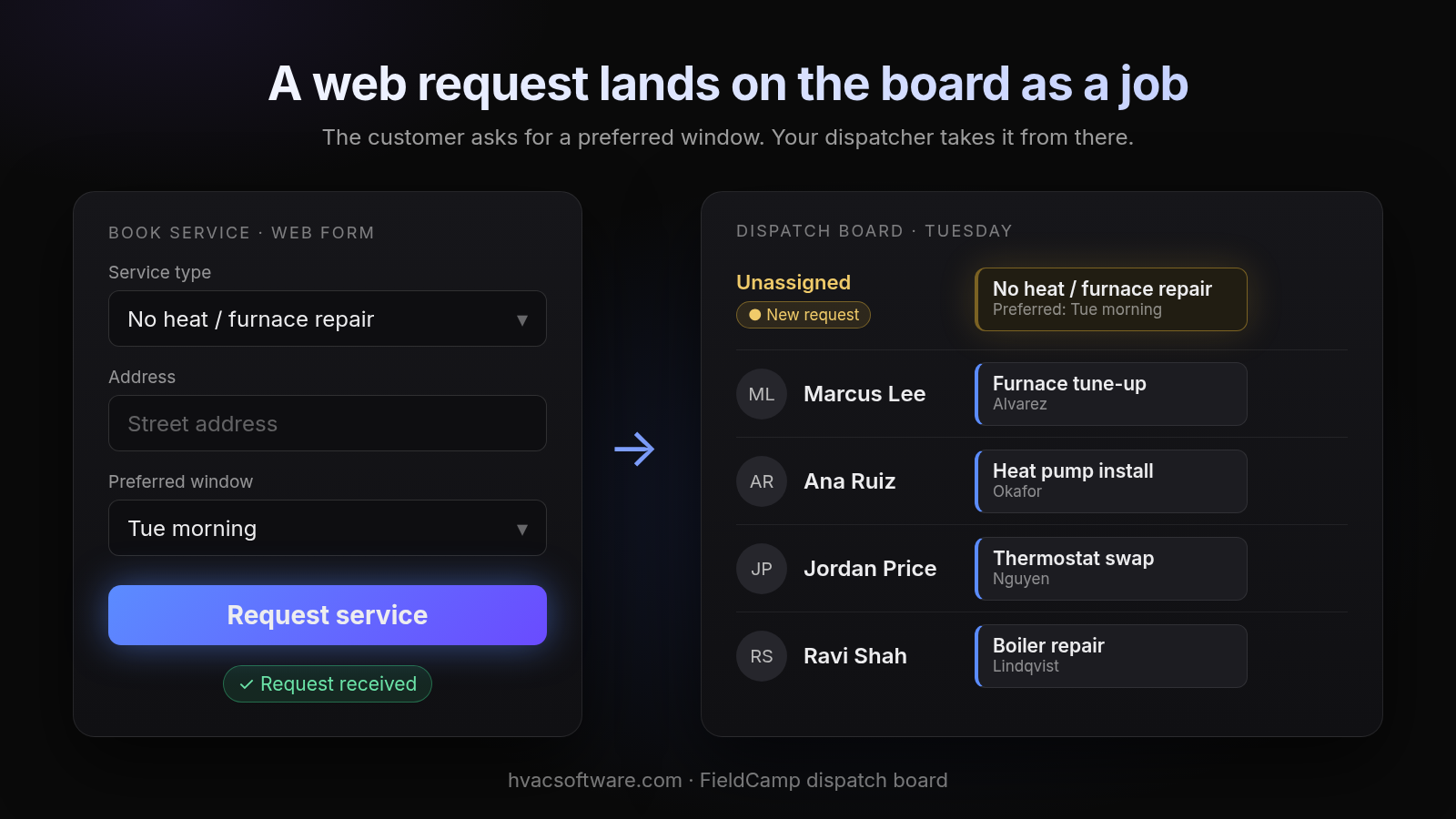
A web request lands on the board as a job
The customer asks for a preferred window. Your dispatcher takes it from there.
Book service (web form): Service type "No heat / furnace repair", Address "Street address", Preferred window "Tue morning". Request service. Request received.
Dispatch board, Tuesday: Unassigned, New request: No heat / furnace repair (Preferred: Tue morning). Marcus Lee: Furnace tune-up. Ana Ruiz: Heat pump install. Jordan Price: Thermostat swap. Ravi Shah: Boiler repair.
How do HVAC booking platforms compare on the checks that matter?
| Platform | Books an exact slot or a request | Checks service area before offering slots | Matches tech skills and capacity | Booking lands on the dispatch board | Tied to equipment record and maintenance agreement | Residential and commercial in one system | QuickBooks Online | Pricing model |
|---|---|---|---|---|---|---|---|---|
| Housecall Pro | Verify with vendor | Verify with vendor | Verify with vendor | Verify with vendor | Verify with vendor | Verify with vendor | Verify with vendor | Check current pricing pages |
| Jobber | Verify with vendor | Verify with vendor | Verify with vendor | Verify with vendor | Verify with vendor | Verify with vendor | Verify with vendor | Check current pricing pages |
| Workiz | Verify with vendor | Verify with vendor | Verify with vendor | Verify with vendor | Verify with vendor | Verify with vendor | Verify with vendor | Check current pricing pages |
| ServiceTitan | Verify with vendor | Verify with vendor | Verify with vendor | Verify with vendor | Verify with vendor | Verify with vendor | Verify with vendor | Quote-based |
| SchedulingKit | Verify with vendor | Verify with vendor | Verify with vendor | Separate booking tool; verify sync | Verify with vendor | Verify with vendor | Verify with vendor | Check current pricing pages |
| FieldCamp | Exact time or arrival window, set by service area | Service area is qualified before availability is shown | Configured capacity limits the times offered at booking; the board checks skills, drive time and conflicts when a job is dragged | Creates a request or job, depending on configuration | Ask in the demo | Yes | Ask in the demo | Ask in the demo |
“Verify with vendor” marks a cell where no source in our research states the fact. Treat these as the questions to ask in a demo.
Want to watch one online booking travel to a live dispatch board? Book a FieldCamp demo.
How does FieldCamp handle online booking?
This site is published by FieldCamp.
- Built for: HVAC shops that run residential and commercial work in one system and want online bookings to arrive as work the office can schedule.
- Online booking: A booking page or website embed lets customers qualify their address against your service areas, choose a service, and pick an exact time or arrival window based on your configured hours and capacity.
- After the click: A completed booking creates the customer record and, depending on configuration, a request or job. Your office can keep a review step before it moves onto the live schedule. When your dispatcher drags the job onto a technician on the dispatch board, the board checks skills, drive time and schedule conflicts, and the dispatcher confirms. The customer gets a text when the job is assigned or moved.
- One record: Each job stays on one record from the first call to the paid invoice, so nobody re-keys details when the day changes. A person still decides the day.
- What it doesn’t do: FieldCamp doesn’t do route optimization or vehicle tracking. Ask in the demo how equipment records, maintenance agreements and accounting fit your setup.
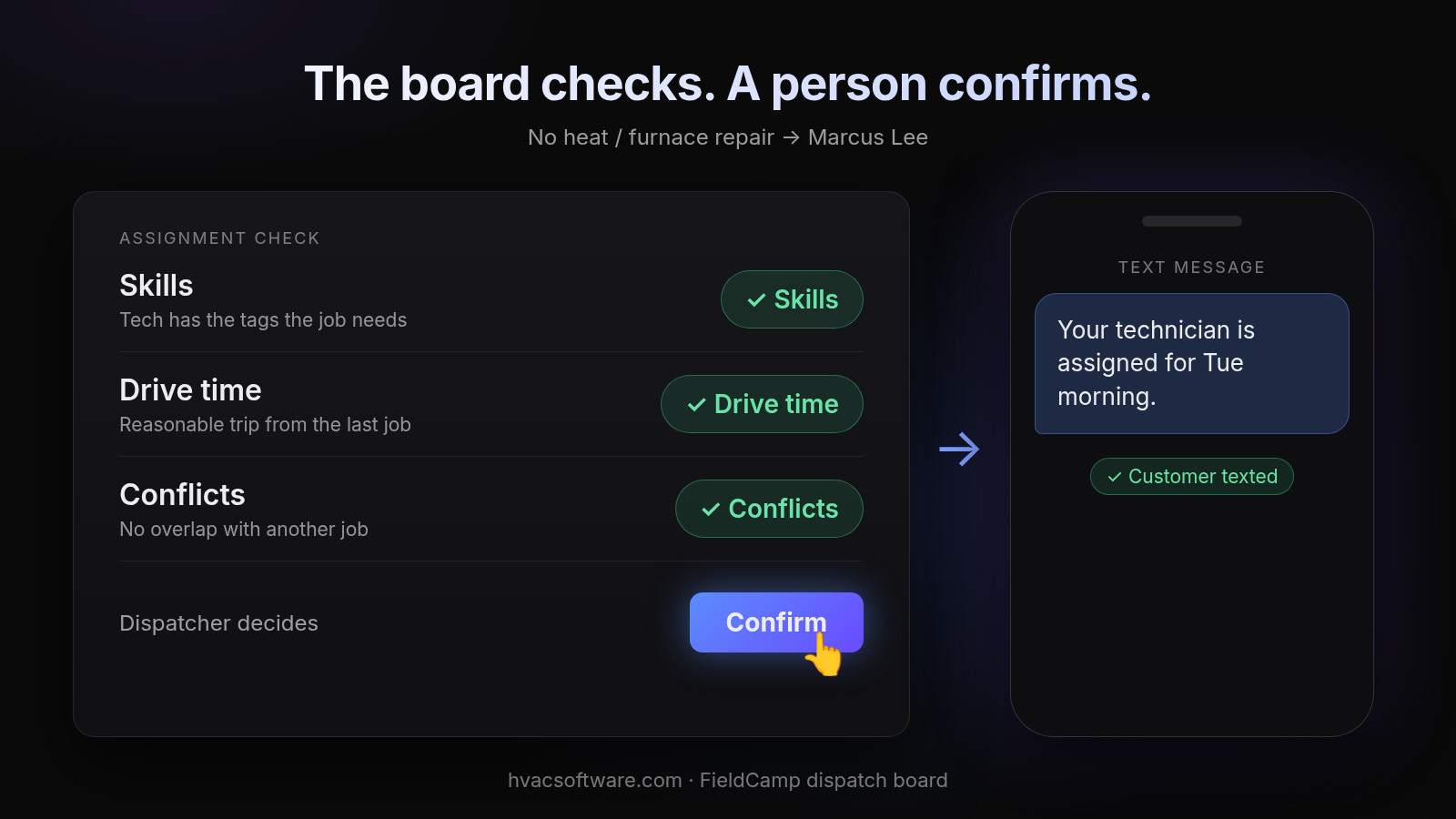
The board checks. A person confirms.
No heat / furnace repair → Marcus Lee
- Skills: tech has the tags the job needs
- Drive time: reasonable trip from the last job
- Conflicts: no overlap with another job
Dispatcher decides: Confirm.
Text message: "Your technician is assigned for Tue morning." Customer texted.
See a booking travel from your website to the dispatch board in your own setup: book a 30-minute FieldCamp walkthrough.
How to choose HVAC scheduling software with online booking
- Start with headcount, including the office. Count technicians, dispatchers and CSRs. User-capped plans that look affordable for a small crew change shape once the whole office is counted.
- Decide between a full platform and a booking page only. If every online booking will be retyped into dispatch and then into QuickBooks Online, a booking page has only moved the data entry, not removed it. If dispatch, invoicing and booking share one record, the booking saves that retyping.
- Weigh maintenance agreements. If a large share of your booked work is agreement visits, rule out any tool where a booking cannot see the agreement.
- Test commercial work separately. Ask the vendor to book a request for a site with several units and watch where it lands.
- Ask how emergencies are handled. Every vendor should explain what its booking flow does with a no-heat call at 9 p.m.
Frequently asked questions
What is the best HVAC scheduling software with online booking?
There is no single best option. The right one depends on your technician count, whether you need a full platform or a booking page only, and whether bookings land on the dispatch board as jobs. Shortlist two or three and run a real booking through each in a demo.
What software do most HVAC companies use?
There is no reliable public count. Small shops often use a field service platform with built-in booking, while larger operations tend to run quote-based enterprise suites. Judge each platform by how it handles your own booking, dispatch and invoicing workflow, not by its market share.
Is there free HVAC scheduling software with online booking?
Some booking tools offer free plans, usually with limits on bookings, users or features. Free booking pages often leave dispatch and invoicing in a separate system, so check current pricing pages and count the retyping you would still do.
Is a general appointment scheduling app enough for an HVAC company?
Usually not on its own. A general scheduling app can take a booking, but it may not check service areas, technician skills, capacity or urgent no-heat and no-cool calls. If you use one, confirm how bookings reach your dispatch board.
What should dispatch software do with an online booking?
It should put the booking on the dispatch board as a job, check the technician’s skills, drive time and schedule conflicts when it is assigned, and let a person confirm the assignment. Ask each vendor to show this live.
What’s the difference between scheduling and dispatching?
Scheduling and dispatch are separate jobs, and route optimization is a third. Scheduling sets when the job happens and dispatch decides who goes. Buyers often blur them, so check that a platform handles each one you need, and ask whether a booked job is already assignable on the dispatch board.
Final recommendation
Make every online booking pass the service-area, capacity and urgency checks before a customer sees a time, and make sure it lands on the dispatch board as a job. Whichever platform you shortlist, book a real job through its online booking in the demo and watch where it lands.